
You check your building’s violation status on a Tuesday. Everything looks clean. By Friday, a new DOB violation appears dated three days ago. The cure deadline? Already passed. Now you’re staring at escalating fines and a mandatory hearing you never saw coming.
NYC agencies don’t knock on your door when violations hit. They post them online and expect you to keep checking. Miss one update, and a $500 fine balloons into $5,000 before you can blink.
Most property managers treat violation tracking like a part-time job. They log into DOB’s BIS system, then HPD’s portal, then FDNY’s database, rinse and repeat across ten different platforms. It’s exhausting. It’s inefficient. And it leaves massive gaps where violations slip through.
The fix? Set up instant notifications that alert you the second a violation posts. No more manual checking. No more missed deadlines. No more surprise penalties.
In this guide, we’ll break down:
- How to sign up for DOB violation alerts through BIS
- Setting up HPD notifications for housing violations
- Getting FDNY alerts for fire safety issues
- Tracking 311 complaints that turn into violations
- Configuring ECB, DEP, and other agency notifications
- Why managing alerts across 10+ portals creates problems
- How ViolationWatch pulls all agency notifications into one dashboard so you never miss another violation again
Let’s sort this out.
Set Up Instant Alerts for NYC Building Violations
Tracking violations across multiple NYC agencies means logging into separate portals, each with its own registration process and notification system. Here’s how to configure alerts for the three major agencies that issue building violations.
DOB Violation Notifications Through BIS
The Department of Buildings operates the most complex notification infrastructure of any NYC agency. Getting alerts requires navigating DOB NOW, the Buildings Information System (BIS), and the underlying NYC.ID authentication layer.
Understanding how these systems connect determines your success in catching violations before they escalate.
Step 1: Create Your NYC.ID Account
NYC.ID serves as the single sign-on gateway for all city services, including DOB NOW. You can’t access DOB’s violation tracking without it. Access the DOB NOW login page directly. Click “Sign Up” to initiate account creation.
The registration form requires:
- A valid email address (this becomes your username)
- A secure password meeting NYC’s complexity requirements
- Your full legal name as it appears on government documents
- A mobile phone number for two-factor authentication
- Your mailing address
NYC.ID uses email verification to activate accounts. Check your inbox within 5-10 minutes of submitting the form. Click the verification link before it expires (typically 24 hours).
If you already have an eFiling account from submitting building applications or permits, those credentials work across the entire DOB NOW ecosystem. Use your existing login instead of creating a duplicate account in multiple NYC.ID accounts tied to the same email cause authentication conflicts.
Step 2: Access DOB NOW and Configure Property Monitoring
After logging into DOB NOW, you’ll land on the main dashboard. This interface consolidates all DOB services: permit applications, violation tracking, inspection scheduling, and document management.
Look for the “My Properties” or “Property Portfolio” section in the left navigation menu. This is where you establish which buildings you want to monitor.
Click “Add Property” and enter the building information using one of three search methods:
- Address search – Enter the full street address (building number, street name, borough)
- BIN (Building Identification Number) – Use the 7-digit identifier assigned to every NYC structure
- BBL (Borough-Block-Lot) – Input the 10-digit tax lot identifier
The system pulls property records from the Department of Finance database. Verify the building details match your records before saving.
You can add multiple properties to your portfolio. Property managers handling 50+ buildings should use the bulk upload feature (CSV template available in the Help section).
Step 3: Link Properties to the Buildings Information System
Adding a property to DOB NOW doesn’t automatically enable violation tracking. You need to explicitly connect each building to BIS monitoring.
From your property portfolio, click on an individual building to open its detail page. Look for “Manage Notifications” or “Violation Alerts” (the label varies depending on your account type).
Toggle on the following alert categories:
- New violations issued – Triggers when DOB posts a fresh violation to the property
- Violation status changes – Alerts you when violations move to “Under Review,” “Dismissed,” or “Resolved.”
- ECB hearing notices – Notifies you of scheduled Environmental Control Board hearings
- Stop Work Orders – Immediate alerts for construction halts (critical for active job sites)
Confirm your email preferences are enabled. Some users report that DOB NOW defaults to “in-app notifications only,” which means alerts appear in your dashboard but don’t send to your inbox.
Step 4: Configure Email and SMS Preferences
Go to Account Settings (usually under your profile icon in the top-right corner). Scroll to the Communication Preferences section.
DOB NOW supports both email and SMS alerts. Email notifications include more detailed violation numbers, addresses, and issue dates. SMS messages provide quick alerts but require you to log in for full information.
Set your notification frequency:
- Immediate – Alerts are sent within 1-2 hours of violation posting
- Daily digest – Consolidated email at 8 AM with all previous day’s activity
- Weekly summary – Single email every Monday covering the prior week
Technical limitation: DOB NOW’s notification system experiences delays during high-volume periods (typically Monday mornings and the first week of each month). Violations issued Friday afternoon might not trigger alerts until Monday evening.
Step 5: Verify Notification Setup Through Test Monitoring
After configuring alerts, run a manual check to confirm the system works. Go to the Buildings Information System (also accessible through DOB NOW). Search for one of your monitored properties. Click “Violations” to view the current list. Note the most recent violation number and issue date.
Wait 24 hours, then check your email for a notification about that violation. If nothing arrives, your alert settings need adjustment.
Common setup failures:
- Email addresses with typos in Account Settings
- Notifications toggled off at the property level (not the account level)
- Spam filters blocking DOB NOW emails (add [email protected] to your contacts)
- Properties added to “Favorites” instead of “Monitored Properties” (different systems)
Pro tip: DOB NOW’s notification reliability drops significantly for buildings with recent ownership changes or properties undergoing major construction. The system sometimes loses the connection between the property record and your monitoring list. Log in monthly to verify your property portfolio still shows all buildings.
HPD Violation Notifications Through PROS
The Department of Housing Preservation and Development runs a legally mandated property registration system that doubles as its violation notification platform. Registration isn’t optional for most buildings; it’s required by law under NYC Admin Code §27-2098.
Step 1: Determine Your Registration Requirements
HPD registration applies to:
- All residential buildings with three or more units
- Mixed-use buildings where residential units represent more than 50% of the total floor area
- Single-room occupancy (SRO) buildings, regardless of unit count
You’re exempt if you own:
- One- or two-family homes (unless subdivided illegally)
- Co-ops and condos where individual unit owners hold title
- Buildings 100% commercial with zero residential space
Failing to register your property carries a $250-$500 penalty per violation cycle. HPD issues these failures-to-register as Class C violations that compound monthly.
Step 2: Register Your Property Through PROS
Navigate to hpd.nyc.gov and locate the Property Registration Online System (PROS) portal. You can access it directly at hpdonline.hpdnyc.org.
Click “Register Property” to start a new registration. The system walks you through a multi-page form requiring:
Owner information:
- Legal name (individual or entity)
- Mailing address (where HPD sends official notices)
- Primary phone number
- Email address for electronic communications
Managing agent details (if applicable):
- Agent’s legal name and company
- Business address
- Direct phone line and email
- New York State Real Estate License number (if agent is licensed)
Property details:
- Building address with apartment/unit breakdown
- Total number of dwelling units
- Number of stories
- Year built (from DOB records)
- Tax lot information (borough-block-lot)
The registration form includes a section for responsible parties, individuals authorized to receive violation notices and attend HPD hearings. You can designate multiple contacts, which helps when your primary point person is unavailable.
Alternative registration method: HPD still accepts paper registrations via mail. Download Form HPD-01 from the HPD website, complete it manually, and mail it to:
NYC Department of Housing Preservation and Development
Property Registration Unit
100 Gold Street, 6th Floor
New York, NY 10038
Paper registrations take 4-6 weeks to process. Online registrations activate within 48-72 hours.
Step 3: Receive Your Registration Confirmation
After submitting your PROS registration, HPD emails a confirmation within 2-3 business days. This email contains:
- Your unique HPD registration number (starts with “PR-” followed by digits)
- Confirmation of the contact information on file
- Instructions for accessing the eCertification portal
- Your initial login credentials (username based on the email you provided)
Check your spam folder if the confirmation doesn’t arrive. HPD emails often get flagged by corporate email filters.
Step 4: Access the HPD eCertification Portal
The eCertification portal is separate from PROS. PROS handles initial registration; eCertification manages ongoing compliance, annual renewals, and violation notifications. Go to hpd.nyc.gov and find the eCertification link (usually under “Property Owners” or “Online Services”). You can also access it directly at hpdonline.hpdnyc.org/ecertification.
Log in using the credentials from your confirmation email. First-time users must reset their temporary password before accessing the full portal.
Step 5: Configure Violation Notification Settings
Once inside the eCertification portal, click on “My Account” or “Notification Preferences” in the main navigation menu.
You’ll see options to enable:
- Violation alerts – Notifications when HPD posts new violations (Class A, B, or C)
- Emergency violations – Immediate alerts for hazardous conditions requiring 24-hour corrections
- Annual registration reminders – Alerts 30 days before your registration expires
- Hearing notices – Notifications of scheduled OATH hearings for contested violations
- Correction status updates – Confirmations when HPD inspectors verify violation corrections
Toggle on all relevant categories. HPD sends notifications to the email address in your account profile. Make sure it’s current.
Step 6: Set Up Multiple Email Recipients
If you manage properties with a team, you’ll want violation alerts going to multiple people. HPD’s portal allows up to five email addresses per property. Go to the property detail page within eCertification. Look for “Additional Contacts” or “Notification Recipients.”
Add team members’ email addresses and assign their role:
- Property Manager – Receives all violations and compliance notifications
- Building Super – Gets alerts about emergency violations only
- Legal Counsel – Receives hearing notices and legal correspondence
- Owner – Gets monthly summary reports
Each contact receives a verification email. They must click the confirmation link to activate notifications.
Step 7: Link Properties to HPD Online for Manual Checks
HPD Online provides a public search tool for checking violations outside the eCertification portal. You don’t need to log in.
This tool is useful for:
- Checking violations on properties you don’t own (competitive research)
- Viewing the complaint history before acquiring a building
- Verifying that corrections are posted properly to public records
Enter any NYC address to see:
- All open violations (with issue dates and class designations)
- Closed violations from the past three years
- 311 complaints filed against the property
- Registration status and ownership information
Technical limitation: HPD Online updates once daily (typically overnight). Violations issued after 6 PM won’t appear until the next morning. The eCertification portal updates in closer to live time violations post within 2-4 hours of inspector submission.
Pro tip: HPD notifications only cover housing maintenance code violations. They don’t include DOB structural issues or FDNY fire safety violations, even if those violations involve residential buildings. You need separate notification systems for each agency.
FDNY Violation Notifications
The Fire Department doesn’t offer automatic violation notifications. No email alerts. No SMS messages. No push notifications through a mobile app. You’re stuck with manual checking.
Why FDNY Doesn’t Provide Alerts?
FDNY’s technology infrastructure lags behind DOB and HPD. The department never built a notification system into its online portals, and there’s no indication they plan to add one.
This creates a serious compliance risk. Fire safety violations often involve life-threatening conditions: blocked exits, non-functional sprinklers, and faulty fire alarm systems. Missing a violation notice can result in:
- Fines starting at $1,000 and escalating to $25,000+ for repeat offenses
- Building closures if hazards pose an immediate danger
- Personal liability for property owners if violations contribute to injuries or deaths
Option 1: Manual Checks Through the FDNY Business Portal
The FDNY Business portal (nyc.gov/fdny) requires an NYC.ID accounts for the same login system DOB uses.
Navigate to nyc.gov/fdny and click “Log In” in the top-right corner. Use your NYC.ID credentials (or create an account if you haven’t already).
After logging in, look for “My Buildings” or “Property Search” in the main menu. The portal layout changes periodically, so the exact navigation path varies.
Enter your building’s information using:
- Full street address – Include building number, street name, and borough
- BIN (Building Identification Number) – The 7-digit DOB identifier
- Block and lot numbers – From your property tax documents
The search results display:
- All active FDNY violations with issue dates and violation codes
- Pending inspections are scheduled for the property
- Certificate of Fitness requirements for building systems (boilers, generators, etc.)
- Fire safety plan filing status
- Emergency action plan compliance
Click on individual violations to see:
- The specific code section violated (usually references Fire Code or Building Code)
- Required correction actions
- Cure deadline (typically 30-90 days, depending on violation severity)
- Fine amounts if violations remain uncorrected
- Inspection history showing previous FDNY visits
Limitation: The FDNY Business portal doesn’t show violations older than three years. Historical violation research requires submitting a Freedom of Information Law (FOIL) request.
Option 2: Search Through the 311 NYC Website
The 311 website provides a simpler search tool that doesn’t require login credentials. It’s less detailed than the FDNY portal but faster for quick checks. Go to 311.nyc.gov and click “Services” in the top navigation. Scroll down to “Building” or search for “Violation Search.”
Enter your property address in the search bar. The system displays violations from all city agencies DOB, HPD, FDNY, ECB, DEP, and others. Filter results by selecting “FDNY” from the agency dropdown menu. This narrows the list to fire safety violations only.
What you’ll see:
- Violation numbers and issue dates
- Brief descriptions of the violations (usually 1-2 sentences)
- Current status (open, under review, dismissed, or paid)
What you won’t see:
- Detailed correction requirements
- Fine amounts or payment status
- Inspection notes from FDNY officers
- Document upload capabilities for proof of correction
The 311 search works best for quick checks when you’re away from your desk. For serious violation management, you need the full FDNY Business portal.
Option 3: FDNY Mobile Inspections and Notifications
FDNY inspectors sometimes provide violation notices on-site during inspections. If you or your building staff are present during an FDNY visit, the inspector hands you a paper copy of any violations issued.
This creates problems:
- Building supers lose paperwork
- Violations issued when no one’s on-site go unnoticed until follow-up inspections
- Mailed notices arrive 2-3 weeks after issue dates, cutting into your correction window
Pro tip: Instruct your building staff to photograph any FDNY notices immediately and email them to your main office. Paper violations disappear, digital copies don’t.
The Manual Checking Schedule You Need
Without automatic alerts, you need a systematic checking routine:
For high-risk buildings (buildings with restaurant tenants, manufacturing spaces, nightlife venues):
- Check the FDNY portal twice weekly (Monday and Thursday)
- Check after any 311 complaint about fire safety
- Check within 48 hours of any FDNY inspection
For standard residential buildings:
- Check the FDNY portal weekly (same day each week)
- Check monthly through 311 for comparison
- Check immediately after fire alarm activations or system failures
For low-risk properties (small residential buildings with modern fire safety systems):
- Check the FDNY portal bi-weekly
- Check after any tenant complaints about fire safety equipment
Set recurring calendar reminders. Missing a single check can mean discovering a violation three weeks late, with half your correction period already gone.
Technical workaround: Some property management software platforms offer violation monitoring services that scrape city databases daily and alert you to new violations. These third-party tools fill the gap FDNY’s lack of notifications creates, but they cost $50-$200 monthly per property.
Pro tip: FDNY violations often stem from 311 complaints. Monitor the 311 website for fire safety complaints filed against your buildings. Complaints don’t always result in violations, but they trigger inspections. Knowing an inspection is coming lets you address issues proactively before the FDNY arrives.
311 Complaint Notifications and Violation Tracking
311 complaints don’t always turn into violations, but when they do, you want to know immediately. The city’s 311 system serves as the front door for tenant complaints, neighbor reports, and anonymous tips about building conditions.
Understanding how to track these complaints gives you early warning before inspectors arrive and violations get issued.
Step 1: Create Your NYC 311 Account
Go to 311.nyc.gov and click “Sign Up” in the top-right corner. Account creation takes less than five minutes. You’ll need to provide:
- A valid email address (becomes your username)
- A secure password
- Your full name
- A mobile phone number (optional but recommended for SMS alerts)
The system sends a verification email immediately. Click the confirmation link to activate your account.
No NYC.ID required: Unlike DOB and FDNY portals, 311 uses its own authentication system. You don’t need to create or link to an NYC.ID account.
Step 2: Access the My Services Dashboard
After logging in, locate “My Services” in the main navigation menu. This section controls all your notification preferences and address subscriptions.
The My Services dashboard lets you:
- Subscribe to addresses for complaint notifications
- View all active 311 requests tied to your properties
- Track complaint resolution status
- Manage alert preferences (email vs. SMS)
Step 3: Subscribe to Specific Addresses
Click “Notification Subscriptions” within My Services. You’ll see an input field asking for the address you want to monitor.
Enter the complete building address:
- Building number
- Street name (spell out “Street,” “Avenue,” etc.)
- Borough (Manhattan, Brooklyn, Queens, Bronx, Staten Island)
- ZIP code
The system autocompletes addresses as you type. Select your building from the dropdown list to ensure the address matches city records exactly.
You can subscribe to multiple addresses. Property managers with large portfolios should add each building individually; there’s no bulk upload feature.
Step 4: Select Complaint Categories for Alerts
After adding an address, the system asks which complaint types trigger notifications. You can’t subscribe to “all complaints;” you must select specific categories.
Critical categories for building violations:
- Heat and Hot Water – Complaints about inadequate heating or hot water service
- Residential Building Conditions – Reports of peeling paint, broken windows, and structural damage
- Plumbing Issues – Leaks, backups, broken fixtures
- Pest Infestations – Rodent or insect complaints
- Illegal Conversions – Reports of unpermitted apartment subdivisions
- Construction Without Permit – Complaints about unauthorized building work
Fire safety and code violations:
- Smoke Detectors – Non-functional or missing smoke/CO alarms
- Blocked Exits – Obstructed fire exits or stairwells
- Fire Hazards – Flammable materials storage, electrical issues
Health and sanitation:
- Unsanitary Conditions – Garbage accumulation, mold, water damage
- Lead Paint – Reports of peeling paint in pre-1978 buildings
- Mold – Visible mold growth or moisture problems
Select all categories relevant to your building type. Residential properties should enable heat/hot water, building conditions, and pest complaints to a minimum.
Step 5: Choose Your Notification Method
311 supports two alert delivery methods:
- Email notifications – Detailed messages with complaint numbers, descriptions, and submission dates. Emails arrive within 1-2 hours of complaint filing.
- SMS text alerts – Brief messages with complaint numbers and addresses. Texts are sent immediately but lack full complaint details.
You can enable both methods. Most property managers use email for comprehensive tracking and SMS for urgent complaint categories (heat/hot water, fire hazards).
Step 6: Verify Notification Setup
After configuring subscriptions, check the “Active Subscriptions” section of your My Services dashboard. You should see:
- Each subscribed address is listed separately
- Complaint categories enabled for each address
- Notification methods (email, SMS, or both)
- Subscription activation date
Test the system by filing a test complaint (you can close it immediately after receiving the notification). This confirms alerts are working correctly.
Step 7: Track Complaints Through the 311 Mobile App
Download the NYC 311 app for iOS or Android. The app provides the same notification features as the website, plus location-based complaint tracking. After installing the app, log in with your 311.nyc.gov credentials. Your address subscriptions sync automatically across web and mobile platforms.
The app’s “My Services” section shows:
- All open complaints for your subscribed addresses
- Complaint status updates (assigned to inspector, inspection scheduled, closed)
- Photos submitted with complaints (when available)
- Resolution notes from city agencies
Pro tip: Enable push notifications in the app settings. Mobile alerts arrive faster than emails, often within 15-30 minutes of complaint submission.
Understanding the Complaint-to-Violation Pipeline
311 complaints trigger inspections, but not all inspections result in violations. Here’s how the process works:
For HPD complaints (heat, hot water, building conditions):
- HPD assigns an inspector within 24-48 hours for emergency complaints
- Non-emergency complaints get inspected within 7-14 days
- If the inspector confirms the reported condition, they issue a violation on-site
- You receive the violation through HPD eCertification (if registered) and see it in the 311 app
For DOB complaints (illegal construction, structural issues):
- DOB typically inspects within 5-10 business days
- Inspectors verify permit status and code compliance
- Violations post to DOB NOW within 24 hours of inspection
- 311 app updates the complaint status to “Closed – Violation Issued.”
For FDNY complaints (fire hazards, blocked exits):
- FDNY inspects within 3-7 days, depending on hazard severity
- Fire safety violations are posted to the FDNY Business portal
- 311 app shows inspection completion, but not violation details
Tracking this pipeline means checking three places:
- 311 app for complaint status
- Agency-specific portal (DOB NOW, HPD eCertification, FDNY Business) for violation details
- Your email for notification alerts from each system
Pro tip: Most violations stem from tenant complaints. If you see a 311 complaint about your building, address the issue before the inspector arrives. Fixing problems proactively often results in inspectors closing complaints without issuing violations.
The Multi-Portal Management Problem

Managing violation alerts across DOB NOW, HPD eCertification, FDNY Business, and 311 requires logging into four separate systems, each with different interfaces, notification settings, and update schedules.
This fragmented approach creates operational gaps that cost money and time.
Reason 1: Notification Delays Compound Across Systems
Each portal operates on its own notification timeline. DOB NOW might alert you two hours after a violation posts. HPD eCertification could take four hours. FDNY requires manual checking with zero alerts.
By the time you’ve checked all four systems, you might be 24-48 hours behind the actual violation issue date. For violations with 30-day cure deadlines, losing two days at the start cuts your response window by nearly 7%.
Time-sensitive violations suffer most. Stop Work Orders from DOB, emergency violations from HPD, and immediate hazard notices from FDNY all require same-day attention. If you’re checking portals once daily, you’re already too late.
The math breaks down like this:
- Check DOB NOW at 9 AM – violation issued at 11 AM (missed until tomorrow)
- Check HPD at 10 AM – violation posts at 2 PM (missed until tomorrow)
- Check FDNY at 11 AM – violation issued at 3 PM (missed until tomorrow)
- Check 311 at noon – complaint filed at 4 PM (missed until tomorrow)
You’re perpetually one day behind across all agencies.
Reason 2: Different Login Credentials Create Access Bottlenecks
DOB NOW and FDNY use NYC.ID authentication. HPD eCertification uses its own credential system tied to property registration. 311 has a completely separate login.
Property managers handling emergencies at 11 PM can’t remember which password goes with which portal. Password reset emails take 10-15 minutes to arrive. Two-factor authentication adds another layer of friction.
Team access gets worse. If you manage properties with multiple staff members, you need to:
- Share NYC.ID credentials (violates terms of service)
- Create separate accounts for each team member on each portal
- Train everyone on four different interfaces
- Update access when staff leave or change roles
Onboarding a new property manager means setting up four accounts, configuring notification preferences in four places, and teaching them four different violation lookup procedures.
Reason 3: Inconsistent Data Formats Prevent Effective Tracking
Each agency formats violation information differently:
DOB violations include:
- Violation number (starts with “35” or “V*”)
- Issue date
- Code section violated
- Device number (for equipment violations)
- Cure date
- ECB hearing date (if applicable)
HPD violations include:
- Violation ID (starts with “HPD-“)
- Issue date
- Violation class (A, B, or C)
- Apartment/unit number
- Current status
- Inspection date
FDNY violations include:
- Summons number
- Fire code section
- Issue date
- Description of hazard
- Required correction action
311 complaints include:
- Service request number
- Complaint type
- Submission date
- Resolution date
- Agency assigned
Trying to consolidate this information into a single tracking spreadsheet means reformatting data from four sources. You can’t copy-paste violation lists; you’re manually re-entering information for every new violation.
Reason 4: No Cross-Agency Violation Visibility
DOB NOW doesn’t show HPD violations. HPD eCertification doesn’t display FDNY violations. The FDNY Business portal doesn’t include DOB issues. 311 shows complaints, but not the resulting violations from any agency.
This creates blind spots. A building might have:
- 2 open DOB violations (structural issues)
- 5 HPD violations (heat and hot water complaints)
- 1 FDNY violation (blocked fire exit)
- 3 active 311 complaints (pending inspection)
You won’t see this complete picture unless you manually compile data from all four portals. Most property managers only discover the full scope of their violation problem when facing a major transaction (sale, refinancing, or tenant lawsuit).
Buildings with multiple violation types face compounding penalties. An HPD heat violation might trigger a DOB inspection of your boiler, which reveals a ventilation code violation, which prompts the FDNY to inspect your mechanical room, which uncovers a fire safety issue.
You’re getting notices from three agencies about the same underlying problem, but no single portal connects these dots.
Reason 5: Alert Fatigue Leads to Missed Critical Violations
High-volume property managers receive dozens of notifications weekly across all portals. DOB sends permit approval emails. HPD sends annual registration reminders. FDNY emails about Certificate of Fitness renewals. 311 alerts you to every complaint filed.
Your inbox becomes noise. Actual violation notices get buried under administrative updates, system maintenance announcements, and informational emails from city agencies.
Email filters don’t solve this. You can’t set up rules to catch only violations because:
- DOB sends violations and non-violations from the same email address
- HPD violation alerts use generic subject lines (“HPD Notification”)
- FDNY doesn’t send violation emails at all
- 311 emails look identical for complaints and complaints-turned-violations
Property managers tell themselves they’ll check emails more carefully, but human attention doesn’t scale. Miss one critical email, and a $500 violation becomes a $5,000 penalty before you realize it existed.
The cognitive load of tracking four systems means something always slips through. You remember to check DOB, but forget HPD. You check on Monday and Wednesday but skip Friday. You review emails but don’t log into portals. Violations fall through gaps you didn’t know existed.
One Dashboard for All NYC Violation Alerts
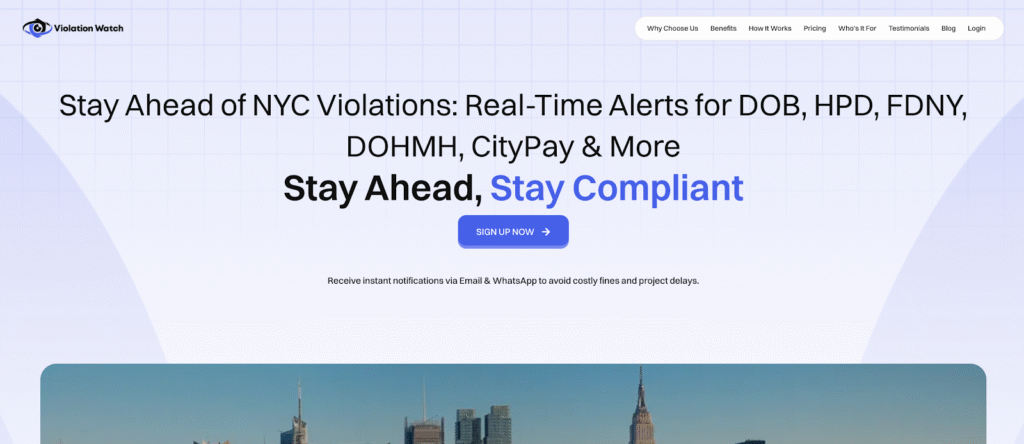
Checking four portals daily doesn’t scale. You need a system that monitors every agency automatically and sends alerts the moment violations post without requiring you to log into multiple platforms.
ViolationWatch consolidates violation tracking across DOB, HPD, FDNY, ECB, DEP, DEC, DOH, DOT, DSNY, and DOF into a single dashboard. You add your properties once, configure your alert preferences, and the platform handles the rest.
How the System Works?
ViolationWatch runs continuous monitoring on NYC agency databases. When a new violation appears for any of your tracked properties, the system detects it within minutes and sends instant alerts through your preferred channels.
Step 1: Add Your Properties to the Platform
Create an account at ViolationWatch and log in to your dashboard. The property setup process takes less than two minutes per building.
Click “Add Address” and enter your building’s information. The system accepts:
- Full street addresses (the platform autocompletes as you type)
- Borough-block-lot numbers
- Building identification numbers (BINs)
The platform pulls existing violation data immediately after you add a property. You’ll see all current open violations across every NYC agency, DOB structural issues, HPD housing code violations, FDNY fire safety problems, ECB summonses, and more.
You can add unlimited properties. Property managers handling large portfolios can bulk upload addresses through a CSV file instead of entering each building individually.
Step 2: Select Which Violation Types Trigger Alerts
After adding properties, configure which agency violations you want to monitor. ViolationWatch lets you customize alerts by violation source and severity level.
Available monitoring options:
- DOB violations – Structural issues, construction violations, façade problems, elevator defects
- HPD violations – Housing maintenance code violations (Class A, B, and C)
- FDNY violations – Fire safety code violations, blocked exits, sprinkler system failures
- 311 complaints – Tenant complaints and anonymous reports (tracks when complaints convert to violations)
- ECB violations – Environmental Control Board summonses and hearing notices
- DEP violations – Water and sewer system violations
- Other agencies – DOH, DOT, DSNY, DEC, and DOF violations
You can monitor all agencies or select specific ones based on your building type and risk profile.
Step 3: Configure Multi-Channel Notifications
ViolationWatch sends real-time alerts through email, SMS, and WhatsApp. You choose which channels receive notifications and who on your team gets them.
- Email notifications include:
- Complete violation details (violation number, issue date, cure deadline)
- Direct links to the violation on the relevant agency portal
- Severity indicators (immediate action required vs. standard cure deadline)
- Property address and unit number (if applicable)
- SMS alerts send instant text messages when high-priority violations are posted. Text alerts work best for:
- Stop Work Orders requiring immediate attention
- Emergency HPD violations with 24-hour cure deadlines
- FDNY immediate hazard notices
- ECB hearing dates and compliance deadlines
- WhatsApp notifications combine the detail of email with the immediacy of SMS. You receive formatted messages with violation summaries and can access full details through embedded links.
Add multiple recipients for each property. Route violation alerts to property managers, building supers, compliance teams, and legal counsel simultaneously. Everyone stays informed without forwarding emails or making phone calls.
Step 4: Monitor Everything from One Unified Dashboard
Your ViolationWatch dashboard displays real-time violation data across your entire portfolio. Color-coded indicators show violation status at a glance:
- Red – Open violations requiring immediate attention
- Yellow – Open violations approaching cure deadlines
- Green – Resolved violations and cleared compliance issues
- Blue – Locations currently monitored with zero open violations
Click on any property to see:
- Complete violation history across all agencies
- Current violation status and cure deadlines
- Document attachments and inspection photos
- Resolution workflows and correction tracking
- Compliance reports and analytics
The platform updates automatically. You’re not manually checking portals; the system pushes updates to you.
Step 5: Track Violations from Detection to Resolution
ViolationWatch doesn’t stop at alerting you to new violations. The platform helps you manage the entire correction process.
For each violation, you can:
- Upload correction documentation (permits, repair receipts, inspection reports)
- Add internal notes about correction status
- Assign violations to specific team members
- Set internal deadlines ahead of official cure dates
- Track inspector follow-up visits
The system sends reminder alerts as cure deadlines approach. You’ll get notifications at:
- 14 days before the deadline
- 7 days before the deadline
- 3 days before the deadline
- Day of the deadline
This prevents violations from slipping through the cracks when you’re managing multiple properties with overlapping deadlines.
What This Solves?
You’re no longer checking four portals daily. You’re not maintaining separate spreadsheets for each agency. You’re not missing violations because you forgot to log into the FDNY’s portal on Friday afternoon. ViolationWatch monitors city databases 24/7. Violations post to agency systems on weekends, holidays, and after business hours, the platform catches them regardless of when they appear.
The cost breaks down to $9.99 per address per month. For a single property, that’s less than the late fee on one missed violation. For a 50-building portfolio, you’re paying $499.50 monthly to protect millions in real estate assets from compliance penalties.
Compare that to the alternative: hiring someone to check four portals daily costs $40,000+ annually in labor alone, and humans still miss violations.
Free Violation Lookup Tool
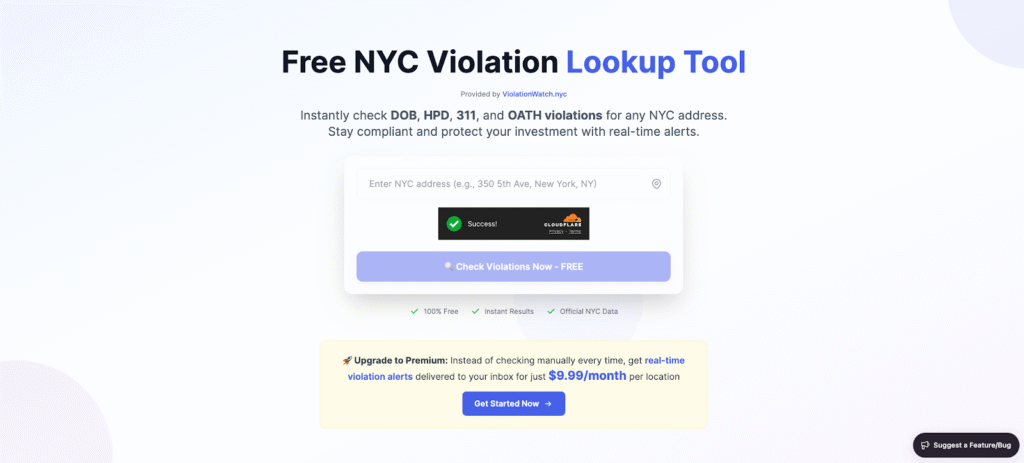
Before committing to monitoring services, you can check your building’s current violation status through ViolationWatch’s free lookup tool, presented with a modern design that both property teams and contractors find easy to follow and navigate.
Enter any NYC address to instantly see:
- All open DOB violations
- Current HPD housing code violations
- Active 311 complaints
- OATH hearing records and adjudication status
The lookup tool pulls data directly from city databases and presents it in a unified format. No separate logins required. No account creation. No cost. Many users rely on it as a first step before taking formal action, especially every proactive landlord who wants clarity without wasted time.
Use this tool to:
- Assess violation risk before purchasing a property
- Verify the correction status after submitting documentation and ensure issues show as corrected
- Check competitor buildings for due diligence
- Review violation history for insurance applications and exposure tied to liens or potential litigations
The free lookup provides a snapshot of current violations, saving you from unnecessary digging through scattered portals and helping you avoid surprises that could impact your holding strategy or budget planning.
Many users share positive feedback, noting how the experience exceeded what they initially thought after they first read through the report and found real value in what they now clearly love using for property checks.
Pro tip: Run a free lookup on your properties right now. You might discover violations you didn’t know existed, violations that are already past their cure deadlines and accruing penalties.
Stop Checking Portals. Start Getting Alerts.
You’ve now got the full breakdown of how to configure violation notifications across NYC’s major enforcement agencies. You know the steps, the portals, and limitations, and you’ve seen exactly where the system breaks down.
Here’s what actually matters:
- DOB NOW and HPD eCertification offer automatic alerts, but only after you’ve created accounts, registered properties, and configured settings correctly across separate systems with different login credentials.
- FDNY provides zero notification capability, leaving you with manual checking as your only option for catching fire safety violations before penalties compound.
- 311 complaint tracking requires address subscriptions and category selections, and even then, you only get alerts about complaints, not always the violations that result from them.
- Managing four separate portals creates notification delays, access bottlenecks, data format inconsistencies, and alert fatigue, any one of which can cause you to miss critical violations.
- The multi-portal approach doesn’t scale beyond a few properties, and even small portfolios face gaps where violations slip through unnoticed until fines escalate.
The manual checking routine works until it doesn’t. You’re one missed login away from discovering a violation three weeks late with half your correction window already gone.
ViolationWatch pulls all those fragmented notification systems into one place. You set up your properties once, configure your alerts once, and the platform monitors every agency automatically. No more daily portal checks. No more missed violations. No more wondering if something slipped through.
Run a free lookup to see what’s already on your buildings. Then decide if automated monitoring at $9.99 per address beats the cost of missing the next violation.