
HPD violations can rack up faster than you can track them down. One missed notice turns into a compounding fine. One overlooked Class C violation becomes a tenant lawsuit waiting to happen.
The problem isn’t that violations exist. The problem is that tracking them manually through NYC’s online portals feels like searching for needles in a haystack that keeps growing. You’re bouncing between multiple agency websites, refreshing pages, cross-referencing addresses, and still missing updates.
Here’s what makes HPD violations particularly tricky: they don’t live in one place. Housing violations span across different databases, are updated at different times, and require different resolution pathways depending on severity class. Miss one ECB hearing date tied to an HPD violation, and you’re looking at default judgments that could’ve been avoided.
We built this guide to show you exactly how to track HPD violations online, no guesswork, no wasted time clicking through broken portal links.
In this article, you’ll learn:
- How to track HPD violations step-by-step using the DOB NOW Public portal (the official method most people use)
- How to pull violation data out of the system, interpret status codes, and spot critical deadlines before they pass
- How automated tracking through ViolationWatch works for smart property managers, construction companies, and real estate investors who need a faster, more reliable system
You can track violations manually through city portals. You can also automate the entire process and get real-time alerts when something changes. We’ll walk through both approaches so you can pick the one that fits your portfolio size and risk tolerance.
Track HPD Violations Through DOB NOW Public Portal
The DOB NOW Public portal gives you access to HPD violations tied to any NYC property. You’ll need the building’s borough and street address to pull records. The system displays active violations, resolved cases, and pending compliance actions all in one search result.
Access the DOB Property Search Page
Open your browser and head to the DOB NOW Public portal. The homepage shows multiple search options, but you want the property search function. Click on “Property Search” or “Building Profile Search,” depending on which interface version loads.
The portal doesn’t require login credentials for basic violation searches. You can access violation histories for any property in the city without creating an account. Start by picking the correct borough from the dropdown menu. Your options are Manhattan, Bronx, Brooklyn, Queens, or Staten Island. Borough selection matters because the system organizes properties by administrative district.
Type the street address into the search field. Use the building’s street number and name, but skip the zip code and state. The system reads addresses like “123 Main Street” but gets confused if you add “Brooklyn, NY 11201” to the end.
Address formatting tips:
- Use street abbreviations the way they appear on official documents (St, Ave, Blvd)
- Spell out directional indicators if they’re part of the street name (East 42nd Street, not E 42nd St)
- For buildings with multiple entrances, use the primary street address listed on the Certificate of Occupancy
Review the Building Profile and Violation History
The search pulls up a building profile that shows permits, complaints, and violations all on one page. Scroll down to find the violations section. HPD violations appear alongside DOB violations in the same list, which can get confusing if you’re only tracking housing-related issues.
Each violation entry includes:
- Violation number: A unique identifier you’ll need for filing dismissal requests or tracking resolution status
- Issue date: When the inspector documented the violation
- Description: What code section was violated, and the specific condition found
- Severity class: Class A (non-hazardous), Class B (hazardous), or Class C (immediately hazardous)
- Status: Open, certified corrected, dismissed, or pending
Look for violations marked “HPD” in the issuing agency column. DOB violations show up in the same list but follow different resolution processes. You need to separate HPD violations from DOB violations to track them correctly.
Understand Violation Status Indicators
The status column tells you where each violation sits in the resolution pipeline. “Open” means the violation needs correction and hasn’t been certified yet. “Certified Corrected” means someone filed paperwork claiming the issue is fixed, but HPD hasn’t verified it.
“Dismissed” violations have been removed from the property record. This happens after you file a dismissal request and HPD approves it. “Pending” status shows up when there’s an ECB hearing scheduled or when HPD is reviewing correction documentation.
Status codes you’ll see:
- Active: Violation is open and accruing penalties
- Resolved: HPD confirmed the correction
- Withdrawn: HPD removed the violation (rare, usually due to inspector error)
- Default: You missed the hearing deadline, and ECB issued a judgment
Track Hearing Dates and Penalty Deadlines
HPD violations can trigger ECB hearings if you don’t correct them within the cure period. The building profile shows scheduled hearing dates, but you need to cross-reference with the ECB portal to get hearing times and ALJ assignments.
Check the “Next Inspection Date” field for Class B and C violations. HPD schedules re-inspections after you certify corrections. Missing a re-inspection means the violation stays open and penalties keep accumulating.
Set up manual calendar reminders for:
- Cure period deadlines (typically 90 days for Class B, 24 hours for Class C)
- ECB hearing dates
- Re-inspection appointments
- Annual certification deadlines for recurring violations
Download and Export Violation Records
The DOB portal lets you print building profiles, but there’s no direct export function for violation data. You can copy violation information into a spreadsheet manually or use a PDF print function to save records.
Click “Print” at the top of the building profile page. Your browser will generate a PDF that includes all violations, permits, and complaints associated with the property. Save these PDFs with a clear naming convention like “PropertyAddress_ViolationHistory_Date.pdf” so you can find them later.
For multi-property portfolios, this manual download process becomes a time sink. You’re printing individual PDFs for each building, then cross-referencing them to spot patterns or track portfolio-wide compliance metrics.
Alternative Method: HPD Online Portal
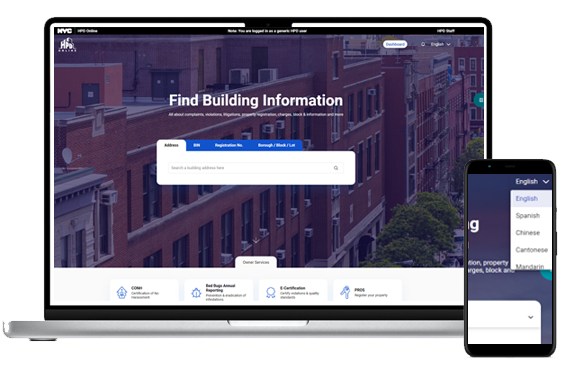
You can also track HPD violations through the HPD Online portal instead of going through DOB NOW. The HPD system focuses exclusively on housing violations, which cuts out the DOB noise if you only need housing-related data.
Go to the HPD Online portal and enter the building address in the search bar. The results page shows HPD violations without mixing in DOB permits or complaints. You get the same violation details (number, description, class, status) but in a cleaner interface.
The HPD portal updates faster than DOB NOW for housing violations. When inspectors issue new violations or update statuses, those changes appear in HPD Online within 24-48 hours. The DOB portal can lag by a few days.
Both portals pull from the same underlying database. The information matches up, but HPD Online gives you a more focused view if you’re only managing housing compliance issues.
Automated HPD Violation Tracking with ViolationWatch
Manual portal checking works until your portfolio grows past three buildings. Then you’re logging into multiple systems daily, refreshing pages to catch status changes, and hoping you didn’t miss a hearing notice buried in your email spam folder.
ViolationWatch automates the entire tracking process. The platform monitors HPD violations across your portfolio 24/7 and sends instant alerts when anything changes. You get notified about new violations, status updates, and approaching deadlines without touching a city portal.
How the System Monitors Your Properties
Add your properties to the dashboard once. ViolationWatch scans city databases continuously, checking for NYC building violations issued by inspectors across all five boroughs. The system pulls violation data from DOB, HPD, ECB, FDNY, and other city agencies automatically.
When a new violation hits your property, you get an alert via email and WhatsApp within minutes. The notification includes the violation number, description, severity class, and cure period deadline. You can route alerts to different team members based on property location or violation type.
The platform tracks everything from fire safety violations to open DOB violations, ECB violations, and notices from the Environmental Control Board. You see unresolved violations that need immediate attention alongside resolved cases that are part of your complaint history. Property owners managing multiple buildings get a complete view of their landlord’s portfolio without running manual searches across different portals.
Setup takes about five minutes per property:
- Sign up and add property addresses to your account
- Configure notification preferences (email, WhatsApp, or both)
- Set up user permissions if you’re managing a team
- The system starts monitoring immediately
No manual data entry after initial setup. No daily portal logins. No spreadsheet updates.
Centralized Dashboard for Multi-Property Portfolios
The unified dashboard shows every violation across your entire portfolio in one view. Sort by property, violation type, severity class, or status. Filter by agency to see only HPD violations from the Department of Housing Preservation and Development, or expand the view to include issues from the NYC Department of Buildings, Fire Department, and other city agencies.
Each violation entry displays:
- Issue date and violation number
- Full history timeline showing certification, inspection, and dismissal dates
- Current status that syncs with city databases automatically
- Severity classification (Class A, B, or C)
- The agency that issued the violation
- Next action required and deadline
You see when the violation was issued, when it was certified corrected, when HPD inspected, and when it was dismissed. The current status updates in the dashboard match what’s in the city database, but you don’t need to check multiple portals to confirm.
Visual indicators help you prioritize:
- Red flags for immediately hazardous class violations requiring immediate attention
- Yellow alerts for violations approaching cure period deadlines
- Orange markers for administrative trials scheduled within the next seven days
- Green checkmarks for resolved violations with confirmed dismissals
The system helps you identify hazardous conditions that require emergency repairs before they turn into housing court cases or trigger civil penalties. Color-coded severity indicators make it easy to spot problems that need your team’s attention right now versus issues that can wait until next week.
Search and filter options include:
- Borough block lot number for precise property identification
- Street address search across all five boroughs
- Building identification number lookup
- Filter by agency (HPD, DOB, ECB, FDNY, DEP)
- Sort by severity, status, or issue date
The dashboard pulls data that traditional portals store in a separate database, giving you access to detailed information about building conditions across your entire portfolio. The property profile overview includes open violations, resolved cases, and complaint history from all relevant agencies in one consolidated view.
Instant Notifications That Actually Save Time
ViolationWatch sends alerts to multiple phone numbers and email addresses. Set up your property manager to receive notifications for one building while your legal team gets alerts for another. Route Class C violations to your compliance officer and Class B violations to your maintenance supervisor.
Alerts arrive faster than HPD mails paper notices to your property. You can start working on corrections before the official notice shows up in your mailbox. For Class C violations with 24-hour cure periods, those extra hours matter.
The system tracks violations affecting rent-stabilized units and notifies you when issues could impact rent stabilized tenants. You get alerts about local law compliance deadlines, window guards installation requirements, and hot water complaints that need resolution within specific timeframes. Notifications include apartment numbers and owner names when violations target specific units within residential properties.
Notification triggers you can configure:
- New violations issued
- Status changes (open to certified corrections)
- Upcoming hearing dates
- Re-inspection schedules
- Dismissal confirmations
- Penalty assessments
Document Management and Compliance Records
Upload correction documentation directly to each violation record. Photos of completed repairs, contractor invoices, permit applications, and inspection reports are all attached to the specific violation they address. When you need to submit proof of correction at an ECB hearing, pull the documentation out of the system instead of searching through email threads.
The platform stores historical violation data even after HPD removes violations from its public portal. You can generate compliance reports showing violation trends across your portfolio, average resolution times, and penalty costs by property or violation type. The system helps you maintain code compliance across other buildings in your portfolio and track how quickly you resolve issues compared to industry benchmarks.
Finding violations becomes easier when you can search across your entire portfolio and filter by agency, severity, or property type. The dashboard shows which properties have the cleanest records and which ones need more attention to meet safety standards and housing preservation requirements.
Free Violation Lookup Tool
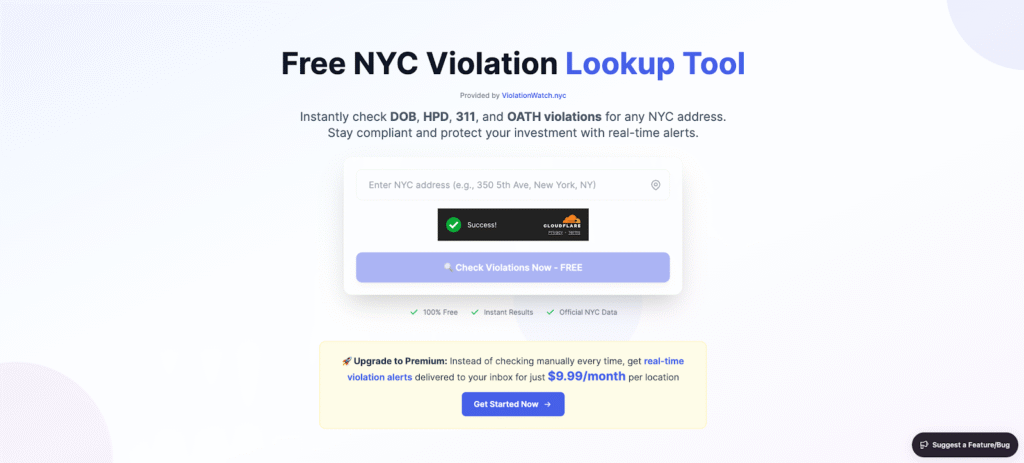
Before committing to a monitoring plan, use the Free NYC Building Violations Lookup tool to check any property in the city. Enter an address and see current violations from all agencies in one search result.
The lookup tool pulls the same data you’d find on DOB NOW or the HPD online database, but formats it in a cleaner interface. You get violation counts by agency, severity breakdowns, and links to detailed violation records. No account required, no credit card needed.
Property managers use the lookup tool during due diligence when evaluating property transactions and property sales. Check a building’s violation history in 30 seconds instead of navigating through the HPD online database and multiple city portals. The tool shows you a few ways to assess risk before closing deals on residential properties or adding new addresses to your portfolio.
Pricing That Scales With Your Portfolio
- ViolationWatch starts with a free trial that includes one property and tracks only 311 violations. No credit card required to test the platform. The trial gives you full access to automated monitoring, instant alerts, and the violation dashboard.
- After the trial, paid plans run $9.99 per address per month. You get unlimited violation tracking, instant WhatsApp and email alerts, and complete access to historical violation data.
The per-property pricing model means you only pay for what you monitor. Managing two buildings costs $19.98 monthly. Managing 100 buildings costs $999 monthly. No hidden fees, no per-user charges, no tiered feature restrictions.
City portals are free to access, but they cost you time. Logging into DOB NOW daily for 20 properties takes about 40 minutes. Checking each property weekly takes 160 minutes monthly. At $9.99 per property, ViolationWatch costs less than an hour of your billable time.
Why Automated Tracking Makes Sense Now
Manual tracking worked when you managed three buildings, and violations came in sporadically. You could refresh the DOB portal once a week and stay on top of everything. That approach falls apart when you’re managing 15 buildings across multiple boroughs.
HPD issued over 200,000 violations citywide in 2024. The average property manager misses at least one status update monthly when relying on manual portal checks. One missed ECB hearing turns into a default judgment that could’ve been avoided with a 48-hour notice.
ViolationWatch eliminates the manual refresh cycle. The system checks for updates every few hours and notifies you the moment something changes. You respond to violations faster, avoid penalty escalations, and spend less time staring at city portals. Properties with active monitoring repair hazards 30% faster on average compared to manual tracking methods. Faster resolution means lower penalty accumulation and better compliance records when refinancing or selling properties.
Track Violations Manually or Let the System Work for You
You now know how to pull HPD violations from city portals and what information to look for in each violation record. You can track violations manually through DOB NOW or HPD Online, or you can automate the entire process and reclaim hours of your week.
What you get from manual tracking:
- Complete violation histories for any property in NYC without paying for software
- Direct access to the same databases that HPD inspectors use to document violations
- Ability to verify violation statuses and hearing dates on your own schedule
- Free access to all city compliance data through public portals
What you lose with manual tracking:
- Hours spent logging into multiple portals weekly to check for status changes
- Delayed awareness of new violations that could be resolved faster with earlier notice
- Risk of missing ECB hearing dates or cure period deadlines buried in portal updates
- No centralized view when managing violations across multiple properties or portfolios
What automated tracking delivers:
- Instant alerts when new violations appear, or statuses change across your portfolio
- Centralized dashboard showing all violations from DOB, HPD, ECB, and other agencies
- Historical violation records that remain accessible even after HPD archives them
- Time savings that scale with portfolio size, from five buildings to 500 buildings
Manual tracking works until it doesn’t. The moment you miss one hearing date or overlook a Class C violation because you were checking a different property, the cost of that mistake exceeds what you’d pay for automated monitoring over an entire year.ViolationWatch handles the tedious portal checking so you can focus on resolving violations instead of finding them. Start with the free violation lookup tool to see what violations are sitting on any property right now, then test the full monitoring platform with a free trial that requires no credit card.