

A single missed violation notice can cost you thousands in fines. Worse? It can shut down your entire operation. NYC building violations don’t arrive with fanfare. They show up as cryptic notices, buried in agency portals, or posted on your property when you’re not looking. By the time you catch them, deadlines have passed, and penalties have piled up.
Here’s the problem: New York City manages violations across 10 different agencies. Each one operates on its own system, timeline, and rulebook. You’re expected to monitor them all, respond fast, and never miss a beat.
Most property managers and building owners scramble between portals, chase paper trails, and cross their fingers that nothing slips through the cracks. That approach doesn’t scale. And it definitely doesn’t protect your bottom line. We’ll show you how violation alerts work, what to do when they hit, and how to set up a system that keeps you ahead of every deadline without the chaos.
Here’s What We’ll Cover:
- What building violation alerts are and why they matter more than you think
- How NYC’s violation agencies operate and what triggers alerts from each one
- Exactly what to do after receiving a violation alert (step-by-step response strategies)
- How to look up violations across DOB, HPD, FDNY, and other NYC agencies
- Why manual tracking fails at scale and costs you money
- How a unified dashboard eliminates the guesswork and automates your compliance workflow
Keep reading!
What Makes Building Violation Alerts Your First Line of Defense
Building violation alerts are official notifications from NYC agencies informing you that your property has failed to meet a specific code, regulation, or safety requirement. They arrive when an inspector identifies a problem, a complaint gets filed, or an agency audit flags your building.
These alerts aren’t suggestions. They’re legal notices that trigger deadlines, mandatory responses, and escalating penalties if ignored.
Why Violation Alerts Demand Immediate Attention
Most property owners treat violation alerts like routine paperwork. That mindset burns money fast.
Here’s what happens when you miss or delay your response:
- Fines compound daily; some violations add $500 to $1,000 per day until resolved
- Your building can face Stop Work Orders, halting construction projects mid-stream
- HPD violations can trigger rent reduction orders, cutting your rental income
- ECB hearings get scheduled without you, and default judgments pile on maximum penalties
- DOB violations can block your Certificate of Occupancy, preventing tenant move-ins or property sales
Each violation alert includes critical information: the violation code, the issuing agency, the deadline to respond, and the potential penalties. Miss any of these details, and you’re already behind.
The stakes get higher when you manage multiple properties. One missed alert across a 20-building portfolio can create a domino effect of missed hearings, compounding fines, and compliance chaos that takes months to untangle.
The Hidden Cost of Manual Alert Tracking
You can’t fix what you don’t catch. And catching violations manually across NYC’s fragmented system is a full-time job.
Property managers typically check agency websites weekly, sometimes daily. They log into separate portals for DOB, HPD, ECB, and other agencies. They cross-reference property addresses, note down new violations, and manually track response deadlines in spreadsheets or calendars.
This process eats hours. It’s prone to human error. And it scales terribly when you add more properties to your portfolio.
Here’s the math: checking 10 agency portals for 15 properties takes roughly 3-4 hours per week. That’s 156-208 hours per year spent on manual tracking alone. Factor in the risk of missing a single violation, say, a $15,000 penalty for a missed ECB hearing, and the cost becomes staggering.
Automated alerts change the equation completely. You get notified the moment a violation appears, across all agencies, for all properties. No portal hopping. No missed deadlines. No spreadsheet gymnastics.
How NYC’s 10 Violation Agencies Operate
New York City splits building code enforcement across 10 separate agencies. Each one has its own jurisdiction, violation codes, penalty structure, and response requirements. You need to understand how they operate because the rules change depending on which agency issues your violation.
Department of Buildings (DOB)
DOB handles structural safety, construction compliance, and building integrity. They issue violations for unsafe conditions, unpermitted work, and code violations related to building systems.
Common DOB violation triggers:
- Construction without permits or approved plans
- Structural defects like cracked walls, unstable facades, or compromised support beams
- Missing or expired elevator inspections
- Illegal alterations or conversions (think: basement apartments without proper egress)
- Failure to maintain fire safety systems
DOB violations often carry Stop Work Orders. If you’re mid-construction and get flagged, your project halts until you resolve the issue and get approval to resume. That’s lost time, contractor delays, and budget overruns.
Response timeline: Most DOB violations require correction within 30-90 days, depending on severity. Class 1 violations (immediate hazards) demand action within 24 hours.
Housing Preservation and Development (HPD)
HPD focuses on housing quality and tenant safety. They respond to tenant complaints about living conditions and issue violations for maintenance failures.
Common HPD violation triggers:
- Heat and hot water failures during heating season (October 1 to May 31)
- Pest infestations (rodents, bed bugs, cockroaches)
- Lead paint hazards in pre-1960 buildings with children under 6
- Broken windows, leaking roofs, or water damage
- Missing smoke detectors or carbon monoxide alarms
HPD violations come in three classes: A (non-hazardous), B (hazardous), and C (immediately hazardous). Class C violations require correction within 24 hours. Ignore them, and HPD can perform emergency repairs, then bill you at inflated rates.
Response timeline: Class A violations get 90 days. Class B violations get 30 days. Class C violations get 24 hours.
Environmental Control Board (ECB)
ECB doesn’t issue violations, it adjudicates them. When other agencies (DOB, HPD, FDNY, DEP) issue violations, you often get summoned to an ECB hearing where penalties are determined.
What triggers ECB hearings:
- Failure to correct violations within the agency’s deadline
- Repeat violations at the same property
- Violations that pose public safety risks
ECB hearings operate like mini-courtrooms. You present evidence, explain corrective actions, and argue for penalty reductions. Miss your hearing, and you get hit with default judgments, maximum fines, with no chance to negotiate.
Response timeline: ECB hearing notices typically give 30-45 days before your scheduled date. You can request adjournments, but you need to file early.
Fire Department (FDNY)
FDNY enforces fire safety codes. They inspect buildings for fire hazards, malfunctioning suppression systems, and blocked emergency exits.
Common FDNY violation triggers:
- Blocked fire exits or obstructed egress paths
- Missing or expired fire extinguishers
- Malfunctioning sprinkler systems or fire alarms
- Storage of flammable materials without proper permits
- Locked or chained exit doors
FDNY violations can shut down your building if the hazard is severe enough. They also require certified correction; you need a licensed professional to fix the issue and file the correction certificate.
Response timeline: Most FDNY violations require correction within 30 days, though immediate hazards demand faster action.
Department of Environmental Protection (DEP)
DEP manages water quality, sewage systems, and environmental hazards. They issue violations for plumbing failures, illegal discharge, and water waste.
Common DEP violation triggers:
- Water main breaks or leaks waste NYC’s water supply
- Sewer backups or illegal connections to the sewer system
- Cross-connections between potable water and contaminated sources
- Failure to install backflow prevention devices
- Illegal discharge of pollutants into waterways
DEP violations often involve expensive infrastructure repairs. A water main break can cost $10,000-$50,000 to fix, and DEP expects a fast turnaround to prevent further environmental damage.
Response timeline: DEP violations typically require correction within 30-60 days, depending on the severity of the environmental risk.
Department of Health (DOH)
DOH oversees public health hazards, particularly in residential buildings. They issue violations for unsanitary conditions and health risks.
Common DOH violation triggers:
- Mold growth from water damage or poor ventilation
- Pest infestations that create health hazards
- Improperly stored garbage attracts vermin
- Lead paint violations in buildings with young children
- Asbestos exposure risks during renovations
DOH violations often overlap with HPD violations, but DOH focuses on health impacts rather than housing quality. They can order immediate remediation if the hazard poses a serious health threat.
Response timeline: Most DOH violations require correction within 30 days, though severe health hazards get 24-hour deadlines.
Department of Transportation (DOT)
DOT handles violations related to sidewalks, street infrastructure, and construction affecting the public right-of-way.
Common DOT violation triggers:
- Cracked or uneven sidewalks that create tripping hazards
- Construction permits that expire or are violated
- Illegal street obstructions (dumpsters, scaffolding without permits)
- Damaged curb cuts or ADA non-compliance
- Sidewalk sheds that exceed permitted time limits
DOT violations can prevent you from renewing construction permits or selling your property. A sidewalk violation stays on your property record until corrected and certified.
Response timeline: DOT violations typically give 45-75 days for correction, depending on the type of violation.
Department of Sanitation (DSNY)
DSNY enforces waste management rules. They issue violations for improper garbage disposal, recycling failures, and sanitation code violations.
Common DSNY violation triggers:
- Garbage left out at incorrect times
- Missing or overflowing recycling bins
- Bulk item disposal without scheduling pickup
- Failure to maintain clean sidewalks and curbs
- Illegal dumping or accumulation of waste
DSNY violations may seem minor, but they stack up fast. Repeat offenders face escalating fines that can reach thousands per month.
Response timeline: Most DSNY violations require immediate correction or corrective action within 7-14 days.
Department of Finance (DOF)
DOF handles property tax liens and financial penalties related to unpaid violations. When you fail to pay fines from other agencies, DOF steps in.
What triggers DOF action:
- Unpaid violation penalties from any NYC agency
- Outstanding property taxes
- Water and sewer charges in arrears
- ECB judgments that remain unpaid
DOF violations become liens on your property. They prevent refinancing, block sales, and accrue interest until paid. If ignored long enough, the city can foreclose.
Response timeline: DOF liens remain until paid in full. Interest accrues monthly.
Department of Environmental Conservation (DEC)
DEC (a state agency) regulates environmental hazards that affect air quality, hazardous materials, and large-scale environmental violations.
Common DEC violation triggers:
- Asbestos handling violations during demolition or renovation
- Improper disposal of hazardous materials
- Air quality violations from HVAC systems or industrial equipment
- Oil tank leaks or spills
- Wetland disturbance or protected area violations
DEC violations often involve environmental remediation, which is expensive and time-consuming. They also require specialized contractors and extensive documentation.
Response timeline: DEC violations vary widely, from 30 days for minor issues to multi-month remediation plans for serious environmental damage.
Your Action Plan After Getting a Violation Alert

A violation alert lands in your inbox or shows up on your property. The clock starts ticking immediately. Your response determines whether you pay minimum penalties or watch fines spiral out of control.
Most property managers freeze when they see violation notices. They’re unsure which steps to take first, what documentation to gather, or how to prioritize multiple violations. That hesitation costs money.
Here’s your systematic approach to handling any violation alert, no matter which NYC agency issued it.
Step 1: Verify the Violation Details
Pull up the complete violation record before you do anything else. You need the full picture, not snippets from an alert email.
Critical information to confirm:
- Full violation code and description
- Issuing agency and inspector name
- Date the violation was issued
- Property address (confirm it matches your building exactly)
- Correction deadline or hearing date
- Penalty amount (initial fine and daily accrual rates)
- Required documentation for correction
Check the violation against your property records. Sometimes violations get issued to the wrong address or for conditions that don’t exist. Catch these errors early, and you can dismiss them before penalties accrue.
Step 2: Classify the Violation by Urgency
Not all violations carry equal weight. You need to triage them based on deadlines and financial impact.
Immediate action required (24-48 hours):
- Class C HPD violations (immediately hazardous conditions)
- DOB Class 1 violations (life safety hazards)
- FDNY violations with Stop Work Orders attached
- Any violation threatening tenant safety or building operations
High priority (1-2 weeks):
- ECB hearing notices with scheduled dates
- DOB violations that could trigger Stop Work Orders
- HPD Class B violations (hazardous conditions)
- DEP violations affecting water systems
Standard priority (30+ days):
- HPD Class A violations (non-hazardous maintenance issues)
- DSNY violations for sanitation code compliance
- DOT sidewalk violations without immediate hazard
- Routine inspection failures with standard correction periods
Sort violations into these categories as soon as alerts arrive. You’ll know which fires to put out first and which ones you can schedule for later.
Step 3: Document the Current Condition
Take comprehensive photos and videos of the violation area before you start any corrective work. This documentation protects you if disputes arise later.
What to capture:
- Wide-angle shots showing the entire violation area and surroundings
- Close-up photos of the specific condition cited in the violation
- Date and time stamps on all visual evidence
- Multiple angles showing context and scope
- Any relevant signage, permits, or posted notices
Store this documentation in an organized system where you can retrieve it quickly. You’ll need it for ECB hearings, agency correspondence, or correction certificate applications.
Step 4: Determine Who Can Fix It
Some violations require licensed professionals. Others you can handle with in-house staff. Get this wrong, and your correction won’t count.
Violations requiring licensed professionals:
- DOB structural repairs (licensed engineer or architect)
- FDNY fire suppression system repairs (licensed fire suppression contractor)
- DEP plumbing and backflow prevention (licensed plumber)
- DOB elevator violations (licensed elevator mechanic)
- Electrical system violations (licensed electrician)
Violations you can potentially handle in-house:
- HPD maintenance violations (heat, hot water, minor repairs)
- DSNY sanitation compliance
- DOT sidewalk cleaning and maintenance
- Simple DOH violations like smoke detector installation
Contact the appropriate professional immediately if a license is required. Most have waiting lists, and your deadline won’t pause while you wait for availability.
Step 5: Create a Correction Timeline
Map out every action item between now and your deadline. Break the correction process into specific tasks with assigned dates.
Sample correction timeline for an HPD Class B violation:
| Task | Responsible Party | Deadline | Status |
| Contact a licensed contractor | Property manager | Day 1 | |
| Schedule site inspection | Contractor | Day 3 | |
| Obtain a repair quote | Contractor | Day 5 | |
| Approve work and schedule | Property manager | Day 7 | |
| Complete repairs | Contractor | Day 15 | |
| Conduct final inspection | Property manager | Day 16 | |
| File correction certificate | Property manager | Day 18 | |
| Verify acceptance by HPD | Property manager | Day 25 |
Build buffer time into your schedule. Contractors get delayed. Parts take longer to arrive than expected. Inspectors find additional issues during repairs.
Step 6: Execute the Correction Work
Once you’ve got your plan and your professionals lined up, start the correction work. Monitor progress closely and document every stage.
During correction:
- Maintain daily communication with contractors
- Take progress photos at each stage of work
- Keep all receipts, invoices, and work orders
- Note any complications or changes to the original scope
- Ensure work meets all code requirements, not minimal compliance
Get written confirmation from your contractor that the work fully addresses the violation. You don’t want to file a correction certificate only to have the agency reject it because the fix was incomplete.
Step 7: File the Correction Certificate
After completing the work, you need to officially notify the issuing agency. This step closes out the violation and stops penalty accrual.
What you’ll need to file:
- Completed correction certificate form (specific to each agency)
- Photos showing the corrected condition
- Contractor licenses and insurance certificates (if applicable)
- Work permits (if required for the type of repair)
- Any inspection reports or test results
Most agencies accept online filing through their portals. Some violations require physical submission with original signatures. Check the specific requirements for your violation type and agency.
Pro tip: File correction certificates as soon as the work is done. Don’t wait until the last day of your deadline. If the agency finds issues with your filing, you’ll need time to address them before penalties restart.
Step 8: Monitor for Agency Acceptance
Filing the certificate doesn’t automatically close the violation. The agency needs to review your submission, and they might reject it if the documentation is incomplete or the correction is insufficient.
Check your violation status weekly after filing. Most agencies update their portals within 7-14 days, but delays happen frequently.
If your correction gets rejected:
- Review the rejection reason carefully
- Address the specific deficiency cited
- Gather additional documentation if needed
- Refile promptly to avoid further penalties
- Follow up with the agency if the rejection seems erroneous
Some violations require a follow-up inspection by the agency. Schedule these quickly. Inspector availability can add weeks to your resolution timeline.
Step 9: Handle ECB Hearings Strategically
If your violation comes with an ECB hearing notice, you’re entering a formal adjudication process. This isn’t optional; miss your hearing, and you get hit with maximum penalties.
Before your hearing:
- Gather all documentation proving correction or explaining delays
- Prepare a clear timeline of actions taken
- Bring contractor affidavits and licenses
- Have photos showing before and after conditions
- Request an adjournment if you need more time (file at least 5 days before the hearing)
During the hearing:
- Present your evidence concisely and professionally
- Explain what caused the violation and how you corrected it
- Show good faith efforts to comply quickly
- Request penalty reductions based on prompt correction
- Ask for payment plans if fines are substantial
ECB judges have discretion to reduce penalties for property owners who act quickly and demonstrate commitment to compliance. Show up prepared, and you’ll often walk away with lower fines than the default judgment would impose.
Step 10: Set Up Preventive Monitoring
Once you close out a violation, the last thing you want is a repeat offense at the same property. Build preventive systems to catch issues before they trigger new violations.
Preventive actions by violation type:
- DOB violations: Schedule regular structural inspections, maintain permit compliance tracking, and set calendar reminders for recurring inspection requirements
- HPD violations: Create tenant communication channels for maintenance requests, conduct seasonal checks before heating season, and establish pest control schedules
- FDNY violations: Set up annual fire safety system testing, train staff on exit path maintenance, and schedule regular fire extinguisher inspections
- DEP violations: Monitor water usage for unusual spikes indicating leaks, schedule backflow prevention device testing, and maintain plumbing system records
Prevention costs less than correction. A $200 annual inspection catches problems before they become $5,000 violation penalties.
How to Look Up Violations Across NYC Agencies
You can’t respond to violations you don’t know about. NYC agencies post violations to their online portals, but each one operates independently. You need to check them all regularly or set up a system that checks them for you.
Here’s how to access violation records across all major NYC agencies.
DOB Violation Lookup
The Department of Buildings maintains two primary lookup tools for violation records, permits, and building information. NYC DOB NOW Public Portal gives you access to current violations, open permits, and recent inspection results. You can search by address, block and lot number, or borough.
What you’ll find in DOB NOW:
- Active violations with correction deadlines
- Dismissed or resolved violations from the past year
- Construction permits and their current status
- Certificate of Occupancy records
- Building characteristics and job filings
- Elevator inspection records
The portal requires an NYC.gov account. Create one using your email address and verify it before you need to look up urgent violations.
DOB Building Information Search provides a simpler search interface for basic building data. It’s useful when you need quick property profile information without logging into DOB NOW.
How to perform a DOB lookup:
- Go to the DOB NOW Public Portal
- Log in with your NYC ID account credentials
- Select “Property Profile” from the main menu
- Enter your building address, borough, or block and lot number
- Review the search results for your property
- Click on “Violations” to see all active and dismissed violations
- Note the violation numbers, dates, and correction deadlines
DOB updates its portal daily. Check it weekly if you manage active construction projects, or monthly for buildings without ongoing work.
HPD Violation Lookup
Housing Preservation and Development tracks all housing maintenance violations, tenant complaints, and litigation records through HPD Online. HPD Online Portal is your central hub for all HPD-related violation data. It’s free to access and doesn’t require an account for basic searches.
What you’ll find in HPD Online:
- Current violations by class (A, B, C)
- Complaint history from tenants or inspectors
- Property registration status
- Charges and litigation records
- Vacate orders and building-wide issues
- Block and lot details for any NYC address
How to perform an HPD lookup:
- Go to the HPD Online portal
- Select “Property Registration” or “Complaints and Violations” from the homepage
- Enter your building address or block and lot number
- Review the property profile page
- Click “Violations” to see all open and closed violations
- Filter by violation class and status
- Note correction deadlines and hearing dates if applicable
HPD’s system shows you the full complaint history for any property. You’ll see patterns if certain apartments generate repeat violations or if building-wide systems keep failing.
Pro tip: HPD violation records include the original complaint text from tenants. Read these carefully, they often contain details not captured in the official violation description.
FDNY Violation Lookup
The Fire Department maintains violation records through its main website and integrates some data with the DOB’s system.FDNY Website provides access to fire code information and violation records. Some features require an NYC.gov account.
What you’ll find through FDNY:
- Fire code violations and summonses
- Vacate orders for fire safety hazards
- Official orders related to building occupancy
- Fire incident reports (requires a request through NYC OpenRecords)
- Building information linked to DOB records
How to perform an FDNY lookup:
- Visit the FDNY website
- Look for sections related to business, violations, or inspections
- Log in with an NYC.ID account to access certain violation records
- Search by property address
- Check the DOB website as well, it often integrates FDNY violation data
FDNY violations appear on both the FDNY’s system and DOB NOW. Cross-check both portals to get complete information, including violation orders and correction requirements.
You can reference the NYC Fire Code to understand specific violation codes and requirements. The fire code page includes the full text of regulations and compliance guides.
ECB Violation Lookup
The Environmental Control Board doesn’t issue original violations, but it adjudicates them. You’ll find ECB hearing notices and judgments through the main ECB portal.
NYC ECB Portal provides hearing schedules, judgment records, and payment information for violations from all agencies.
How to perform an ECB lookup:
- Visit the NYC Environmental Control Board website
- Access the “Check Status” or “Hearings” section
- Search by violation number, respondent name, or address
- Review scheduled hearings and past judgments
- Check payment status for any outstanding penalties
ECB records show you when hearings are scheduled, what penalties were assessed, and whether you have outstanding balances. Set up alerts for hearing dates so you never miss one.
DEP Violation Lookup
The Department of Environmental Protection tracks violations related to water, sewer systems, and environmental hazards through its online portal.
DEP Online Services lets you search for violations, water bills, and compliance records by property address.
How to perform a DEP lookup:
- Go to the NYC DEP website
- Navigate to property services or violation search
- Enter your property address or account number
- Review water usage, billing, and violation records
- Check for open violations and correction deadlines
DEP violations often tie into water billing accounts. If you see unusual spikes in water usage, check the DEP portal for leak-related violations before they escalate.
DOH Violation Lookup
The Department of Health maintains violation records for health code enforcement, including issues like mold, lead paint, and pest infestations. NYC DOH Portal provides access to health violation records, though some overlap with HPD’s system.
How to perform a DOH lookup:
- Visit the NYC Department of Health website
- Search for property health inspections or violations
- Enter your building address
- Review health code violations and complaint records
- Note any required remediation timelines
DOH violations often require specialized remediation. Lead paint and asbestos violations need certified contractors and extensive documentation to close out properly.
DOT Violation Lookup
The Department of Transportation handles sidewalk violations, street infrastructure issues, and construction permits affecting public right-of-way. NYC DOT Portal tracks sidewalk violations, construction permits, and street infrastructure complaints.
How to perform a DOT lookup:
- Go to the NYC DOT website
- Navigate to the sidewalk or permit sections
- Search by property address
- Review open violations and permit status
- Check correction deadlines and required certifications
DOT violations require certified contractors to close out. You’ll need a licensed sidewalk contractor to repair defects and file the correction certificate.
DSNY Violation Lookup
The Department of Sanitation issues violations for waste management and sanitation code compliance. These appear through the ECB system and DSNY’s own portal.
How to perform a DSNY lookup:
- Check the ECB portal for sanitation violation summonses
- Visit the DSNY website for sanitation code information
- Search by address or violation number
- Review violation descriptions and penalty amounts
- Note correction requirements and hearing dates
DSNY violations typically involve immediate correction fix, sanitation issues, and document compliance for your ECB hearing.
DOF Violation Lookup
The Department of Finance handles unpaid violation penalties that become liens on your property. NYC DOF Portal shows you all outstanding liens, property tax records, and unpaid violation judgments.
How to perform a DOF lookup:
- Visit the NYC Department of Finance website
- Access the property tax or lien search tool
- Enter your property address or block and lot number
- Review all outstanding liens and charges
- Check interest accrual and payment requirements
DOF liens block property sales and refinancing. Clear them quickly to maintain a clean title and avoid foreclosure risk.
Why a Unified Dashboard Beats Manual Tracking Every Time
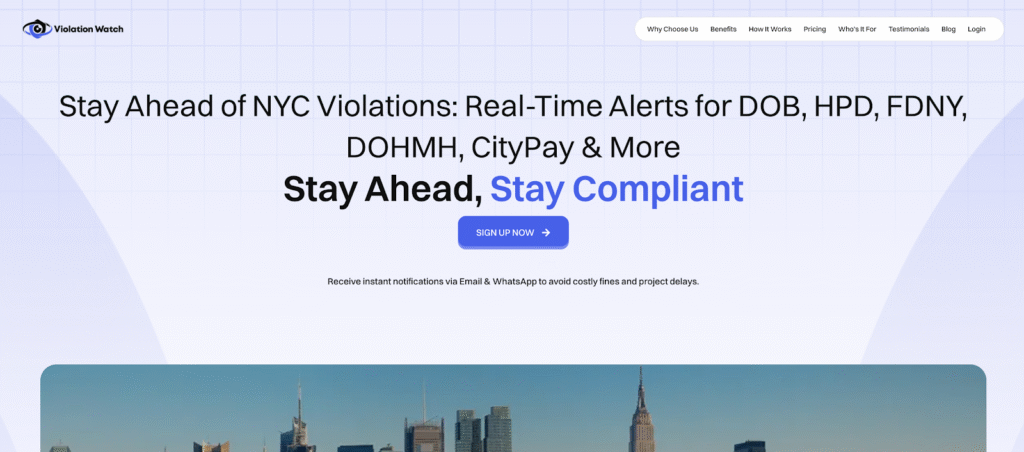
You’ve seen the problem. Ten agency portals. Separate logins. Different search interfaces. Violations scattered across systems that don’t talk to each other.
Manual tracking forces you to be the integration layer between disconnected government databases. You’re the one logging in, searching addresses, cross-referencing results, and hoping you didn’t miss anything. That approach worked when you managed two properties. It breaks down completely at scale.
A unified dashboard solves this by pulling all violation data into one centralized platform. You check one system instead of ten. You get alerts automatically instead of hunting for them. You track deadlines in one place instead of maintaining spreadsheets across multiple agencies.
What a Unified Violation Dashboard Actually Does
Think of it as a command center for your entire compliance operation. Every violation from every NYC agency flows into a single interface where you can monitor status, track deadlines, and manage responses.
Core functions of a unified dashboard:
- Centralized violation tracking across DOB, HPD, ECB, FDNY, DEP, DEC, DOH, DOT, DSNY, and DOF
- Automatic status updates that sync with agency databases without manual checking
- Real-time alerts sent via email and WhatsApp when new violations appear
- Deadline tracking that flags upcoming correction dates and hearing schedules
- Document storage that keeps correction certificates, contractor licenses, and photos organized by violation
- Multi-property management that lets you monitor violations across your entire portfolio from one screen
- Historical records showing resolved violations and compliance trends over time
You’re not reinventing the wheel here. You’re using technology to do what you’ve been doing manually but faster, more accurately, and without the constant risk of missing something critical.
How ViolationWatch Automates Your Compliance Workflow
ViolationWatch connects directly to NYC’s violation databases and monitors them continuously for changes. When a new violation appears on any property in your portfolio, the system catches it and sends you an alert immediately.
This helps you stay ahead of the most common types of problems issued by city agencies, including open DOB violations, zoning violations, and building code violations tied to NYC Department of Buildings enforcement.
Here’s how the workflow operates from start to finish.
Step 1: Add Your Properties
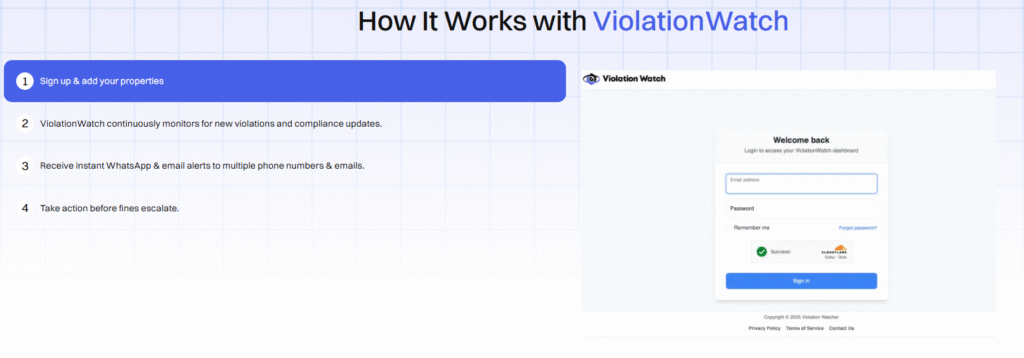
You start by adding your building addresses to the platform. Enter each property once, and ViolationWatch begins monitoring all 10 NYC agencies for violations at those addresses. The system validates each address against NYC’s property database to confirm accuracy.
You can add unlimited properties—single buildings, large portfolios, or locations involved in property transactions that may reveal frequently cited compliance issues. This ensures you avoid outdated spreadsheets and maintain clean, streamlined tracking.
Step 2: Continuous Automated Monitoring
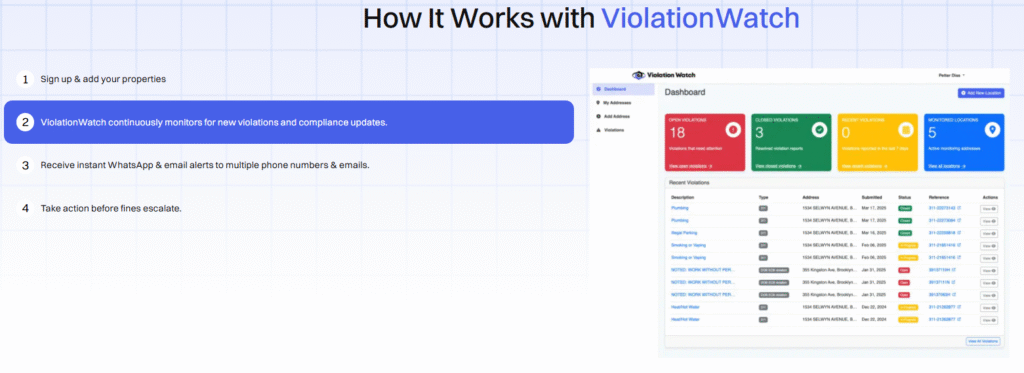
ViolationWatch checks agency databases for new violations and compliance updates. The monitoring runs automatically in the background. You don’t trigger searches manually or remember to check portals weekly.
The platform identifies trigger violations, including immediately hazardous violations, emerging zoning regulations conflicts, or failures tied to local law requirements and safety standards. This end-to-end visibility strengthens your overall building compliance.
Step 3: Instant Alerts Across Multiple Channels
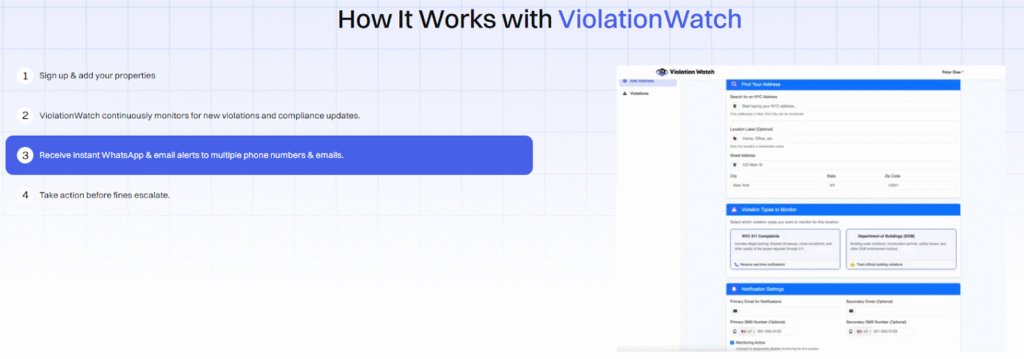
New violations trigger immediate notifications. You get alerts via email, and WhatsApp is sent to as many phone numbers and email addresses as you need.
Alert details include:
- Violation type and issuing agency
- Property address
- Violation description and code
- Correction deadline or hearing date
- Penalty information
- Direct link to full violation details in your dashboard
Your property managers, maintenance team, and compliance staff get notified simultaneously, allowing you to resolve issues quickly and stay compliant without delay.
Step 4: Track Everything from One Dashboard
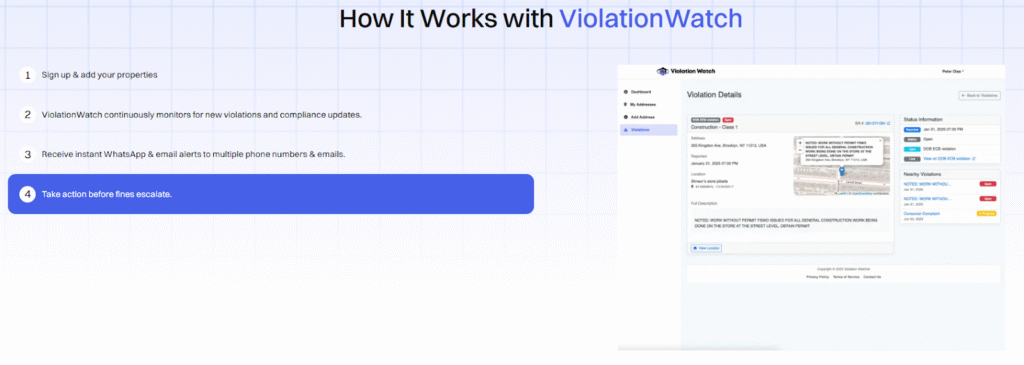
Your dashboard displays all violations across all properties in a single view. You can filter by property, agency, violation status, or urgency level.
Dashboard views include:
- Open DOB violations requiring immediate action
- Violations tied to building code violations and life safety risks
- Administrative trials with upcoming ECB dates
- Monitoring locations showing all tracked properties
- Recent activity summarizing the newest updates
Color-coded indicators help you spot which issues threaten life safety, violate safety standards, or ensure safety for tenants and occupants.
Step 5: Organized Document Management
Every violation needs documentation. Correction certificates. Contractor licenses. Before-and-after photos. Inspection reports. Payment receipts. ViolationWatch stores all these documents directly within each violation record. Upload files from your computer or phone, and they’re instantly accessible to your entire team.
When you need to pull up proof of correction for an ECB hearing, you’re not searching email attachments or physical file cabinets. You open the violation record and download the files.
Step 6: Access Expert Compliance Support
Complex violations often need professional guidance. ViolationWatch provides access to compliance specialists who understand NYC’s violation landscape inside and out.
You can reach out when you’re unsure how to respond to a violation, need help preparing for an ECB hearing, or want advice on the most cost-effective correction approach. The support team has handled thousands of violations and knows what works.
The Efficiency Gains You’ll Actually See
Switching from manual portal checking to automated monitoring changes your daily workflow dramatically.
Time saved on routine tasks:
- No more logging into 10 separate agency portals
- No more manual spreadsheet updates, tracking deadlines
- No more setting calendar reminders for each violation
- No more forwarding violation notices to your team manually
- No more searching the email for contractor documentation
Reduced risk of costly mistakes:
- Zero missed violations because you forgot to check a portal
- Zero missed deadlines because a calendar reminder didn’t fire
- Zero lost documentation because files got buried in email threads
- Zero communication gaps because team members didn’t get forwarded notices
The platform handles all the repetitive, error-prone tasks that eat your time and create compliance risk. You focus on decision-making and correction strategy instead of data entry and portal navigation.
How Multi-Property Management Actually Scales
Managing five properties manually is tedious. Managing 20 is nearly impossible without a team dedicated solely to violation tracking. A unified dashboard scales effortlessly. Add your 21st property and the system starts monitoring it automatically. Add your 50th, and the workflow remains identical to when you had five.
Portfolio-wide visibility includes:
- Total open violations across all properties
- Properties with the most urgent issues
- Compliance trends showing which buildings generate repeat violations
- Agency-specific violation patterns across your portfolio
- Financial exposure from pending penalties and ECB judgments
You can spot systemic issues quickly. If three buildings all show HPD heat violations every winter, you know you need better heating system maintenance across those properties. If DOB violations cluster around renovation work, you know your permit compliance process needs tightening.
This portfolio-level insight is impossible when you’re checking violations, building by building across disconnected agency portals.
Free NYC Building Violations Lookup Tool
Before committing to a full monitoring solution, you can check any NYC property for violations using ViolationWatch’s Free NYC Building Violations Lookup tool at lookup.violationwatch.nyc/lookup. Enter any address, and you’ll see current violations from major NYC agencies. The lookup shows you what’s currently on file without requiring account creation or payment.
Use it to spot-check properties before acquisition, verify violation status during due diligence, or confirm that corrections have been accepted by the relevant agencies.
Why Automation Matters More Than You Think
Manual violation tracking creates three major problems that automation eliminates completely.
- Problem 1- Human error compounds: You check nine agency portals and forget the tenth. You note a deadline wrong by one day. You forgot to check a secondary property address. Small mistakes create expensive consequences when violations compound daily. Automated systems don’t forget. They don’t transpose numbers. They check every portal, every time, with perfect consistency.
- Problem 2- Response time determines penalties: The faster you respond to violations, the lower your costs. Manual tracking introduces delays at every step. You might check a portal three days after a violation appears, then take another day to notify your team. Automated alerts arrive within minutes of violations appearing in agency systems. Your response starts immediately instead of days later.
- Problem 3- Tracking doesn’t scale linearly: Adding properties to your manual tracking system increases workload exponentially. Each new building adds checking time across all 10 agencies. Your tracking burden grows faster than your portfolio. Automated monitoring scales linearly. Adding properties costs zero additional effort. The system handles unlimited buildings with the same efficiency as it handles one.
You’ll never wonder if you’re missing violations. You’ll never scramble to check portals before a property closing. You’ll never discover an old violation that’s been accruing penalties for months. Complete visibility means you know about every violation the moment it appears. You track every deadline without manual calendar management. You have every document you need when the ECB hearings arrive.
That’s the difference between hoping you’re compliant and knowing you’re compliant. Your compliance workflow becomes predictable, manageable, and scalable regardless of how many properties you add to your portfolio.
Stop Checking Portals. Start Managing Violations.
You’ve got the full picture now. Building violation alerts aren’t optional paperwork; they’re legal deadlines with financial consequences that compound daily. NYC’s 10-agency system doesn’t make compliance easy, but you can build a workflow that handles it systematically.
What you now know how to do:
- Recognize when violation alerts demand immediate action versus standard response timelines across all NYC agencies
- Look up violations across DOB, HPD, FDNY, and other agency portals using their respective search tools
- Execute a 10-step response strategy that takes you from receiving an alert through final correction acceptance
- Identify which violations require licensed professionals and which ones your team can handle internally
- Prepare documentation and evidence for ECB hearings that reduce penalties and demonstrate good faith compliance
- Understand why manual portal checking breaks down at scale and creates gaps that cost money
The manual approach worked when you had time to check portals daily and managed a handful of properties. That approach stops working when your portfolio grows, your team expands, or you simply want to reclaim hours spent on repetitive tracking tasks.
ViolationWatch pulls violations from all NYC agencies into one dashboard, alerts you instantly when new violations appear, and keeps your entire team synchronized on deadlines and corrective actions. You get the complete visibility manual tracking promises but never delivers, without the portal hopping, spreadsheet maintenance, or constant worry that something slipped through.Set your properties up once. Get violations out automatically. Respond faster. Pay less in penalties.