

A single DOB violation can cost you $25,000 in fines. Two violations? A stop-work order that halts your project for months. You find out too late.
The problem isn’t getting violations. Buildings rack them up constantly. The problem is knowing they exist before they snowball into financial disasters. Most property owners check violations the same way they’ve always done it, manually, slowly, and with gaps big enough to miss critical deadlines.
That stops today. We’re going to show you exactly how to check DOB violations in NYC, why the old methods fail you when it counts, and how to automate the entire process so you never miss another alert. No theory. Just the exact steps you need.
Here’s what we’ll cover:
- Why DOB violations can shut down your building (and drain your bank account)
- How to look violations up through the official DOB portal
- Why manual checks leave you exposed to delays and incomplete data
- What automated lookup tools do that manual searches can’t
Every sentence in this guide exists to save you time and money. Let’s get started.
DOB Violations Cost More Than You Think
You can’t afford to ignore DOB violations. They don’t disappear on their own, and the city won’t send you a courtesy reminder before things get expensive.
Every violation carries weight. Some hit you with fines that compound daily. Others trigger stop-work orders that freeze your entire project. The worst ones? They can revoke your certificate of occupancy and make your building legally uninhabitable.
The Financial Hit Starts Small, Then Multiplies
A Class 1 violation might start at $500. Seems manageable. But here’s what happens next. Miss the correction deadline, and that $500 becomes $1,000. Miss it again, and you’re looking at $2,500. By month three, you’ve crossed into five-figure territory, all from one violation you didn’t know existed.
Here’s how DOB violations stack up:
- Class 1 (Hazardous) – $500 to $25,000+ per violation
- Class 2 (Major) – $250 to $10,000+ per violation
- Class 3 (Minor) – $250 to $500+ per violation
The fines aren’t one-time payments. They accrue. Each day you leave a violation open adds to your total. A building with three or four open violations can rack up $50,000 in penalties before you’ve even filed a correction.
Stop-Work Orders Freeze Everything
DOB doesn’t mess around with safety violations. When they issue a stop-work order, your construction halts immediately. No exceptions. No grace period.
Your contractors go home. Your timeline extends by weeks or months. Your investors start asking uncomfortable questions. And you’re still paying for permits, insurance, and equipment that sits idle while you sort violations out.
We’ve seen projects delayed six months over violations that could have been cleared in two weeks if someone had caught them early.
Certificate of Occupancy Revocations
This one’s the nightmare scenario. DOB can pull your C of O if violations pile up or if you’ve got serious safety issues left unresolved. No C of O means no legal occupancy. Your tenants have to leave. Your rental income stops. Your property value drops.
Getting a C of O reinstated isn’t quick. You’ll need to clear all outstanding violations, pass inspections, and prove compliance. That process can take months, and every day without a C of O is a day without revenue.
Violations Follow Your Property Forever
Here’s what most owners don’t realize that violations are attached to the building, not the owner. Sell your property with open violations, and they become the buyer’s problem.
Except they won’t buy. Smart buyers run DOB checks during due diligence. Open violations kill deals or force you to accept massive price cuts. We’re talking 10-20% reductions to compensate for the liability you’re handing over.
You can’t hide violations. They’re public record. Every lender, buyer, and tenant can look them up in minutes.
The Ripple Effect Touches Everything
Violations don’t exist in isolation. They trigger consequences across your entire operation.
What violations affect:
- Insurance premiums spike when carriers see open violations
- Loan applications get denied or delayed during underwriting
- Tenant retention drops when violations signal neglect
- Future permits face extra scrutiny from DOB inspectors
- Property taxes stay high because you can’t challenge assessments with outstanding violations
One violation creates friction. Multiple violations create systemic problems that touch every aspect of building management.
The city doesn’t call you when a violation gets filed. They post it to their system and expect you to check regularly. Most owners don’t. They find out about violations when a fine arrives, a stop-work order goes up, or a deal falls through. By then, your options narrow and your costs multiply.
That’s why checking violations isn’t optional; it’s the first line of defense against problems that compound faster than you can manage them.
How to Look Up DOB Violations the Manual Way

The official DOB portal exists. You can use it. But prepare yourself for a process that feels like it was designed in 2005 because it was.
We’ll walk you through the exact steps, then show you why this method creates more problems than it solves.
Step-by-Step Process Through DOB NOW
The city makes violation data public through its Building Information Search (BIS) system. Here’s how you access it.
Step 1: Access the DOB BIS Portal
- Open your browser and go to the portal
- You’ll land on the Building Information Search homepage
- No login required, the system is open to the public
Step 2: Choose Your Search Method
The portal gives you three ways to look buildings up. Pick the one that matches the information you have.
- By Address – Enter the house number, street name, and borough
- By Block and Lot (BBL) – Input the 10-digit tax lot identifier
- By Building Identification Number (BIN) – Use the 7-digit unique building code
Most people search by address because that’s the information they actually have on hand.
Step 3: Enter Building Information
Let’s say you’re searching by address. Here’s what the system asks for.
- Type the house number in the first field
- Enter the street name in the second field (spell it correctly; the system is picky)
- Select the borough from the dropdown menu
- Click “Search”
The system runs your query and pulls building records up.
Step 4: Navigate to the Building Profile
Your search returns a list of matches. Click on the correct building to open its profile page. This page shows basic building information, address, BIN, BBL, occupancy type, and construction details. You’re not looking for this. You need violations.
Step 5: Access the Violations Tab
Look for the navigation menu on the left side of the screen. You’ll see multiple tabs.
- Click on “Violations” or “DOB Violations”
- The system loads a new page with violation records
Step 6: Review Violation Details
Now you’re looking at a table with violation data. Each row represents one violation. The table shows limited information per violation.
- Violation Number – The unique identifier DOB assigns
- Issue Date – When the violation was filed
- Violation Type – Class 1, 2, or 3 classification
- Description – A brief (often cryptic) explanation
- Status – Open, dismissed, or resolved
Step 7: Click Through for Full Details
The summary view doesn’t give you everything. Click on individual violation numbers to see the complete record. This opens a detailed page that includes inspection notes, correction deadlines, and any actions taken. Sometimes. The data can be incomplete or may be missing key information.
Step 8: Manually Record What You Find
The portal doesn’t let you export data, set up alerts, or track changes over time. You need to write violations down yourself.
- Copy violation numbers into a spreadsheet
- Note the issue dates and deadlines
- Track status changes manually
- Check back regularly to see if anything new appears
Step 9: Repeat for Every Building You Manage
Got a portfolio? You’re doing this process for each property individually. The system doesn’t support bulk searches or multi-building views. Ten buildings mean ten separate searches. Twenty buildings means twenty. You get the idea.
Why Manual Checks Set You Up for Failure
You’ve now spent 15-30 minutes looking at one building. Congratulations, you’re already behind. The manual lookup process isn’t slow because you’re doing it wrong. It’s slow because the system was built for occasional spot checks, not active portfolio management.
- The Data Lag Problem: DOB updates its portal with a delay. Violations can take 24-48 hours to appear in the system after an inspector files them. Sometimes longer. That gap matters when you’re racing against correction deadlines. A violation filed on Monday might not show up in your Tuesday search. By the time you see it on Wednesday, you’ve already lost two days. What gets delayed:
- New violation postings
- Status updates on existing violations
- Hearing dates and outcomes
- Correction certifications
You’re always working with yesterday’s information, not today’s.
- Missing and Incomplete Records: The BIS portal has gaps. We’re not talking about occasional missing data; we’re talking about systematic holes in the information you need to take action. Some violations show up with vague descriptions that don’t tell you what actually needs fixing. Others are missing correction deadlines or hearing dates. A few don’t display any inspector notes at all. You can’t fix problems when you don’t know what the problem is.
- No Alert System Exists: The city won’t notify you when violations appear. They post it to the system and expect you to check regularly. How regularly? That’s up to you to figure out. Check once a week, and you might miss time-sensitive violations. Check daily, and you’re burning hours on repetitive manual searches. Neither option is sustainable for busy property managers. What you miss without alerts:
- New violations filed between your check-ins
- Upcoming hearing dates
- Correction deadline expirations
- Status changes that require your response
- One Building at a Time: The portal forces you to search properties individually. No bulk lookups. No portfolio views. No way to see all your violations in one place. Managing five buildings means five separate searches. Managing fifty means you’re spending entire mornings clicking through the same process over and over. The system treats every search like it’s your only property. It has no concept of portfolio management.
- You can’t Track Changes Over Time: The BIS portal shows you a snapshot of right now. It doesn’t show you what changed since your last check. Did a new violation appear? You’ll need to compare your current results against whatever notes you took last time. Did a status update? Same deal manual comparison required. There’s no change log. No history view. No way to see trends across your buildings without building your own tracking system from scratch.
- The Data Doesn’t Connect to Anything: Violations exist in isolation on the BIS portal. They’re not linked to your documents, your contractor information, your compliance calendar, or anything else you need to actually resolve them. You find a violation. You write it down. Then you switch to email to contact your contractor. Then you open your file system to find the relevant permits. Then you check your calendar to schedule the correction. Every violation becomes a multi-system scavenger hunt.
- Human Error Compounds Fast: Manual tracking means manual mistakes. You misread a violation number. You forgot to check one building. You lose the spreadsheet where you wrote everything down. One mistake cascades. A missed violation leads to a missed deadline. A missed deadline leads to compounding fines. Such fines lead to stop-work orders. The system puts all the responsibility on you to be perfect, every time, with tools that make perfection impossible.
What Automated Tools Actually Do

Automated violation tracking isn’t about working faster. It’s about removing the failure points that manual systems create by design. Here’s what changes when you automate the lookup process.
- Continuous Monitoring Replaces Spot Checks: Automated tools don’t wait for you to remember to check. They monitor DOB systems continuously and catch violations the moment they appear. No more gaps between check-ins. No more wondering if something new came in since your last search. The system watches your buildings 24/7 and flags changes instantly. What continuous monitoring catches:
- New violations within hours of filing
- Status changes on existing cases
- Hearing date assignments
- Correction confirmations
- Portfolio Views Replace One-at-a-Time Searches: Automated systems aggregate all your buildings into a single dashboard. You see every violation across your entire portfolio in one place. No more clicking through individual properties. No more wondering which building has what. Everything displays in a unified view that you can sort, filter, and analyze. Got 50 buildings? You’re looking at one screen, not 50 separate searches.
- Instant Notifications Replace Manual Checking: Automated tools push alerts to you the moment something requires attention. New violation? You get notified. Upcoming hearing? Calendar reminder sent. Deadline approaching? Alert delivered. The system comes to you instead of making you hunt information down. You can set:
- New violation filings
- Status updates
- Hearing date reminders
- Deadline warnings
- Resolution confirmations
- Structured Data Replaces Cryptic Records: Automated platforms parse DOB data and present it in readable, actionable formats. No more decoding inspector shorthand or figuring out what vague descriptions mean. The system organizes violations by severity, deadline, and resolution status. You see what needs attention first and what can wait. Everything becomes scannable and prioritized automatically.
- Historical Tracking Replaces Memory: Automated tools maintain complete violation histories for every building you manage. You can see when violations appeared, how long they took to resolve, and what patterns emerge over time. That history helps you spot recurring issues before they become systemic problems. It also provides documentation for insurance claims, legal disputes, and compliance audits. What historical tracking reveals:
- Buildings that generate repeat violations
- Contractors who consistently miss deadlines
- Violation types that take the longest to resolve
- Seasonal patterns in inspection activity
- Integration Replaces Fragmentation: Automated systems connect violation data to your documents, contacts, and workflows. You can attach correction certificates, link contractor information, and schedule resolution tasks without leaving the platform. Everything related to a violation lives in one place. No more switching between apps, emails, and file systems to piece information together. The system becomes your single source of truth for compliance management.
- Accuracy Replaces Human Error: Automation removes the mistakes that manual tracking creates. No misread violation numbers. No forgotten buildings. No lost spreadsheets. The system captures every detail correctly and keeps records up to date automatically. You make decisions based on accurate data instead of hoping your notes are right.
The manual lookup process works if you’ve got one building, unlimited time, and a high tolerance for busywork. For everyone else, it’s a risk you can’t afford to take.
Your Free Ticket Out of Manual Violation Tracking
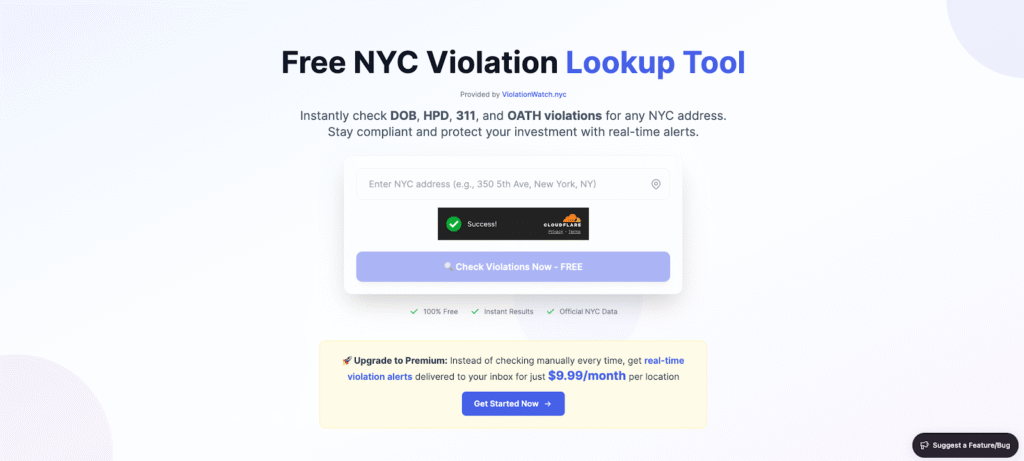
We built the ViolationWatch lookup tool to simplify how you find NYC building violations without bouncing between disconnected systems. No signup required. No credit card. No friction. You gain fast access to ECB violations, HPD violations, and records pulled from the NYC Department of Buildings and other city agencies across New York City, all surfaced through verified NYC open data.
This tool gives you instant clarity at the moment violations appear, helping you act before fines escalate and disrupt ongoing construction projects or property operations.
How does the Free Tool Work?
The process takes less time than brewing coffee. Here’s what happens when you run a search.
Step 1: Enter Your Building Address
Head to the tool and type your NYC property address exactly as it appears on your documents. The system validates entries using the official building information system, ensuring your lookup reflects the correct property identifiers and property profile overview.
- Use the full street address format (e.g., 225 Liberty Street, New York, NY)
- The system auto-validates addresses as you type
- Location pins help confirm you’ve got the right building
Hit enter or click the search button.
Step 2: Address Validation Happens Instantly
Address verification confirms accuracy and prevents wasted effort tied to incorrect entries. This process aligns your lookup with the correct issuing unit and complies with transparency guidelines under applicable information law.
The validation step catches typos before you waste time searching for buildings that don’t exist. It also links your search to the correct BIN and BBL identifiers automatically.
Step 3: We Query Multiple Agency Databases
With one search, the platform scans the environmental control board, HPD, DOB, and OATH simultaneously. Unlike scattered portals, this unified process delivers consolidated search results from a single action. Here’s where things get interesting. While the DOB portal makes you search one agency at a time, our tool hits multiple databases simultaneously.
Systems we search:
- Department of Buildings (DOB)
- Housing Preservation and Development (HPD)
- NYC 311 complaints
- Office of Administrative Trials and Hearings (OATH)
The search runs in parallel across all four systems. You get comprehensive results instead of fragmented data.
Step 4: Results Load in a Clean Report
Your report displays everything you need in a structured view, including open DOB violations, formal notices, and official references tied to underlying inspection reports. No cluttered interface. No confusing navigation. Everything displays in a single, scannable view.
The report shows you exactly what matters.
- Total violation count – How many open issues exist right now
- Status breakdown – Active violations vs. closed cases
- Violation details – Reference numbers, descriptions, and filing dates
- Agency source – Which department filed each violation
- Severity classification – Class 1, 2, or 3 categorization
Each violation links to its official NYC record along with the verified current status, so you can verify details if needed.
Step 5: Scan for What Needs Attention
The report organizes violations by status automatically. Open violations appear at the top, closed ones below. You see what demands action first. Color-coded status badges make scanning effortless. Yellow means in progress. Red means urgent. Green means resolved. You process information visually instead of reading every line.
Violation descriptions appear in plain language, not inspector code. When DOB writes “FAIL TO MAINTAIN BLDG WALL,” we show you what that actually means.
What Makes This Different from the Department of Buildings DOB’s Portal
Speed is the obvious difference. But the real advantage runs deeper than that. Our tool goes beyond the limits of the NYC DOB portal by pulling additional data sources and delivering instant alerts that help you stay informed without constant manual checks or wasted effort.
Unlike traditional systems that rely on slow refresh cycles and scattered results, our platform provides structured insights supported by actionable highlights and contextual pro tips that guide faster decisions. The clarity gives you the operational freedom to act with purpose instead of reacting under pressure driven by missed deadlines or delayed visibility.
Free tool advantages:
- Multi-agency search in one query
- Clean, readable violation reports
- Status-based organization
- Direct links to official records
- Zero login requirements
You check violations in 30 seconds instead of 30 minutes.
How ViolationWatch Monitoring Actually Works?
The full ViolationWatch platform runs on an AI-powered monitoring engine that watches your properties around the clock. You set it up once, and it handles everything else. Here’s the system in action.
- We Connect to Your Portfolio: Add your buildings to the dashboard through a simple bulk upload or one-by-one entry. Each property gets linked to official city databases through its BIN and BBL identifiers. The system validates every address and confirms it’s pulling data from the correct records. No guesswork. No manual verification needed.
- Our AI Monitors Violations Continuously: Once your buildings are in the system, our monitoring engine starts watching them. It checks DOB, HPD, 311, and OATH databases every few hours for changes. New violation filed? We catch it. Status update posted? We log it. Hearing date scheduled? We flag it. The AI doesn’t just scrape data, it analyzes patterns and identifies which violations need immediate attention vs. which ones can wait.
- You Get Instant Email Alerts: When something changes, you hear about it immediately. No more discovering violations weeks after they appear. Alert types we send:
- New violation filings within hours of posting
- Upcoming hearing dates with calendar reminders
- Approaching correction deadlines
- Status changes on existing violations
- OATH fine notifications
Each alert includes the full violation details and a direct link to your dashboard. You click through and see everything you need to respond.
- Everything Lives in One Dashboard: Your ViolationWatch dashboard consolidates every violation across your entire portfolio. Sort by building, filter by status, and search by violation type; however, you need to view the data. The dashboard tracks resolution progress automatically. You mark violations as “in progress” when you start working on them. The system updates the status when DOB closes them. You see which buildings consistently generate violations, which violation types appear most often, and how long resolutions typically take. That data helps you spot problems before they become patterns.
- Documents Attach Directly to Violations: Upload correction certificates, contractor invoices, inspection photos, and any other relevant documents right to the violation record. Everything stays organized in one place instead of being scattered across email and file systems. When you need to prove compliance or reference past work, you pull documentation up in seconds.
What the Monitoring Service Costs
ViolationWatch monitoring runs $9.99 per month per location. That’s it. No setup fees. No annual contracts. No hidden charges.
What you get for $9.99/month:
- Unlimited violation checks for that address
- Instant email alerts for new violations and updates
- Complete violation history and tracking
- Document storage and management
- Access to the full compliance dashboard
- Multi-agency monitoring (DOB, HPD, 311, OATH)
You can monitor one building or a hundred. Pricing scales linearly; each property costs the same monthly rate.
How monitoring pays for itself:
- Catch violations before fines compound (saves $500-$25,000+ per catch)
- Avoid stop-work orders that delay projects for months
- Prevent C of O revocations that halt rental income
- Reduce time spent on manual tracking (saves 5-10 hours/month)
- Maintain clean violation records that protect property values
One avoided fine covers years of monitoring costs. The service isn’t an expense; it’s insurance against problems that cost exponentially more.
Getting Started Takes Five Minutes
You don’t need to overhaul your workflow or learn complex software. ViolationWatch fits into how you already work.
Quick setup process:
- Create your free account
- Add your buildings by address or bulk upload
- Set your alert preferences (email, frequency, violation types)
- Let the system start monitoring
Your first alerts arrive within hours. The dashboard populates with current violation data immediately.
You can start with the free lookup tool to test a few properties, then upgrade to monitoring when you’re ready. Or jump straight into full monitoring if you’re managing active portfolios. Either way, you stop playing catch-up with violations and start staying ahead of them.
Stop Checking Violations Manually
You now know exactly how to look up DOB violations and why the manual process sets you up to fail. The city won’t make this easy for you. Their systems were built for occasional lookups, not active portfolio management.
Here’s what sticks.
What you’ve learned:
- DOB violations compound fast $500 turns into $25,000 if you miss deadlines or don’t catch them early enough
- Manual searches through the BIS portal waste hours and leave gaps that cost you money when violations slip through
- Automated monitoring catches violations within hours of filing and sends alerts directly to your inbox before problems escalate
- ViolationWatch’s free lookup tool searches DOB, HPD, 311, and OATH databases simultaneously in under 30 seconds
- Full monitoring costs $9.99/month per property and eliminates manual tracking while protecting you from compounding fines
The difference between reactive and proactive violation management comes down to tools. You can keep searching buildings one at a time, hoping you catch problems before they explode. Or you can automate the entire process and let the system watch your properties while you focus on running your business.
We built ViolationWatch because we’ve been in your position, staring at spreadsheets, missing deadlines, and wondering why the city makes compliance so unnecessarily difficult. The free lookup tool gives you instant access to multi-agency violation data right now. Need continuous monitoring? Set it up and start getting alerts today.
And if you’ve any questions? Reach us at 433 Broadway #220, New York, or call +1 347-201-2336. We’re here to help.