
You check HPD’s portal on Monday morning. No violations. Friday afternoon rolls around, and suddenly, three new violations sit there waiting for you. When did they show up? Tuesday? Thursday? You have no idea.
Missing new HPD violations costs money. Tenants file complaints, inspectors show up, and violations get issued. By the time you catch them, deadlines are tighter, and fines start piling up. The problem isn’t that violations happen; it’s that you find out too late.
Here’s what most property managers don’t know: HPD doesn’t send automatic alerts when new violations hit your properties. You’re stuck checking manually, hoping you catch problems before they spiral out of control. But there’s a better way to stay ahead of HPD violations without constantly refreshing government portals.
Here’s what we’ll cover:
- Why HPD’s official portal doesn’t offer violation alerts (and what that means for your workflow)
- How automated tracking tools monitor your properties 24/7 and send instant notifications
- How real-time alerts help you respond faster, avoid penalties, and maintain compliance across your entire portfolio
Let’s get started!
HPD’s Portal Wasn’t Built for Proactive Monitoring
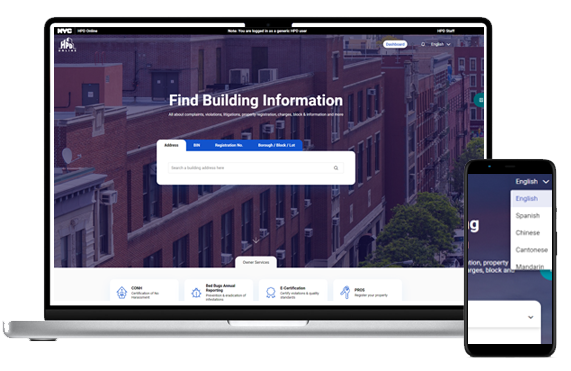
The HPD Online portal gives you access to violation data. That’s it. You can search properties, pull up violation histories, and check current statuses. What you can’t do is set up alerts, subscribe to updates, or get notified when something new hits your buildings.
This is a reactive system, not a proactive one. The portal assumes you’ll check it regularly on your own schedule. There’s no notification feature, no email alerts, no SMS updates. You’re expected to log in, search each property manually, and scan for changes.
How the Manual Check Process Works
Here’s the standard workflow for tracking HPD violations through the official portal:
- Go to the HPD Online portal: You’ll need to open the portal each time you want to check for updates.
- Search for the property: Enter the building’s address in the search bar and wait for results to load.
- Review the violation information: The portal displays any violations tied to that building, along with their current status and key dates.
That process covers one property. If you manage 10 buildings, you repeat those steps 10 times. If you manage 50 buildings, you’re looking at an hour or more spent clicking through addresses and cross-referencing dates.
What This Means for Your Daily Workflow
Without automated alerts, you’re forced into a manual checking routine. Most property managers tackle this in one of two ways:
- Daily portal checks: Log in every morning and search each property individually
- Weekly sweeps: Set aside time once or twice a week to review your entire portfolio
Both approaches share the same problem: violations slip through. You might check on Tuesday, and a new violation gets issued on Wednesday. You won’t know about it until your next manual check, which could be days away.
The gap between when a violation appears and when you discover it creates real risks. Deadlines start ticking the moment HPD issues the violation, not when you happen to find it. A five-day head start becomes two days because you didn’t check the portal soon enough.
The Hidden Costs of Manual Tracking
Checking portals manually doesn’t sound that bad until you factor in the cumulative impact:
- Time waste: Searching properties one by one adds up fast across a large portfolio
- Missed deadlines: Late discovery means less time to respond and fix issues
- Higher fines: Violations that age without action can trigger escalating penalties
- Tenant complaints: Problems go unaddressed longer when you’re unaware they exist
You’re not getting real-time information. You’re getting whatever happens to be in the system the moment you check. That creates a blind spot between your last search and your next one.
Why HPD Doesn’t Offer Alert Features
HPD’s portal serves a specific purpose: public record access. The system was designed to make violation data available, not to help property managers stay on top of their portfolios. It’s a database query tool, not a property management platform.
Government portals prioritize transparency and data accessibility. They don’t typically build features for specific user groups like landlords or property managers. The result is a one-size-fits-all interface that gives you information but doesn’t help you act on it efficiently.
What you can do with HPD Online:
- Look up violations by address
- Check complaint statuses
- Review violation details and history
- Access NYCHA property violations (for inspections after September 15, 2025)
What you can’t do:
- Set up automatic notifications
- Monitor multiple properties simultaneously
- Get alerts when new violations appear
- Track changes without manual searches
The portal wasn’t built for speed or convenience. It was built for compliance with public record laws.
Automated Tools Fill the Gap HPD Left Open
Manual checking works until it doesn’t. You miss one day, and that’s the day a Class C violation shows up. You forget to check a specific building, and suddenly you’re facing penalties for issues you didn’t know existed.
Automated tracking tools solve this by doing what HPD’s portal can’t: they watch your properties around the clock and notify you the moment something changes. No more logging in daily. No more searching each address individually. The system monitors everything and sends alerts directly to you.
How Continuous Monitoring Actually Works
Automated platforms connect to NYC’s violation databases and scan them constantly for updates. When a new HPD violation appears on one of your properties, the system detects it immediately and triggers an alert.
Here’s what sets automated monitoring apart from manual searches:
- 24/7 database scanning: The system checks for updates continuously, not when you remember to log in
- Instant detection: New violations get flagged within minutes of appearing in city records
- Multi-property coverage: Track 5 buildings or 500 without adding extra work to your day
- Zero manual effort: You receive notifications automatically instead of searching for changes yourself
The process runs in the background. You don’t need to do anything after the initial setup. The tool handles the monitoring, and you get the alerts.
Why Property Owners Can’t Afford to Miss Violations
Failure to catch violations issued early creates a domino effect. What starts as a single violation notice can snowball into civil penalties, additional fines, and even legal complications if left unaddressed.
The NYC Department of Housing Preservation and Development (HPD) doesn’t send reminders. Once a violation type gets recorded in the Building Information System, the clock starts ticking. Property owners managing multiple buildings face even greater risk because tracking each building identification number manually through a system that requires login becomes overwhelming fast.
Common violations that escalate without monitoring:
- Peeling paint violations that trigger lead-based paint inspections and specialized documentation requirements
- Lack of hot water complaints that become Class C violations if not resolved within 24 hours
- Non-hazardous maintenance issues that seem minor but compound across a large portfolio
- FDNY violations related to fire safety equipment, sprinklers, or alarm systems
- Missing permits for construction or renovation work that create compliance gaps
When you’re dealing with potential issues across multiple properties, small problems compound quickly. Fines escalate when violations age without resolution, and additional penalties stack up for repeat offenses under local law requirements.
Cross-agency compliance challenges:
The Department of Housing Preservation and Development isn’t the only entity watching your properties. You’re juggling violations, permits, and compliance across multiple agencies simultaneously. Cross-agency violations create visibility problems when search results from different portals don’t talk to each other.
- You might address an HPD issue, but miss a related documentation request from the FDNY
- Contractors working on remediation need access to accurate violation records to provide proper services
- Unresolved violations can lead to liens against your property, making it harder to refinance or sell
- Missing deadlines or failing to provide proof creates cascading issues that tie up properties in housing court
Automated monitoring eliminates these gaps by tracking everything in one place and alerting you before minor issues become major headaches.
The Four-Step Process Behind Instant Alerts
Platforms like ViolationWatch use AI-powered engines to automate violation tracking across your entire portfolio. The workflow is straightforward but powerful.
- Step 1: Sign up and add your properties: Create an account and input the addresses you manage. The platform stores your portfolio and prepares to monitor each location for violations across all NYC agencies, including HPD.
- Step 2: Continuous monitoring kicks in: ViolationWatch scans city databases 24/7 for new violations and compliance updates tied to your properties. The AI engine checks multiple data sources simultaneously, catching changes as soon as they’re posted.
- Step 3: Receive instant WhatsApp and email alerts: When a new HPD violation appears, you get notified immediately through WhatsApp and email. Multiple team members can receive alerts, so the right people always know what’s happening. The notification includes key details about the violation, so you can assess urgency right away.
- Step 4: Take action before fines pile up: With early awareness, you have maximum time to address the violation. Review the full details in your dashboard, assign tasks to your team, and start resolution work while deadlines are still far off.
This automated loop means you’re always working from current information instead of discovering problems weeks after they appeared.
What Makes AI-Powered Monitoring Different
Traditional tracking tools pull data from city databases. AI-powered platforms do that and analyze the information to give you context. ViolationWatch’s engine doesn’t send you raw violation numbers. It organizes the data, highlights urgent issues, and presents everything in a unified dashboard. You see open violations, closed violations, pending actions, and upcoming deadlines all in one place.
The AI handles the heavy lifting:
- Filters noise: Only relevant updates trigger alerts, so you’re not overwhelmed with notifications
- Prioritizes urgency: Critical violations get flagged immediately, helping you focus on what matters most
- Tracks status changes: Get notified when violations are resolved, hearings are scheduled, or deadlines shift
You’re not managing a flood of data. You’re getting actionable information delivered exactly when you need it.
Free NYC Building Violations Lookup for Quick Checks
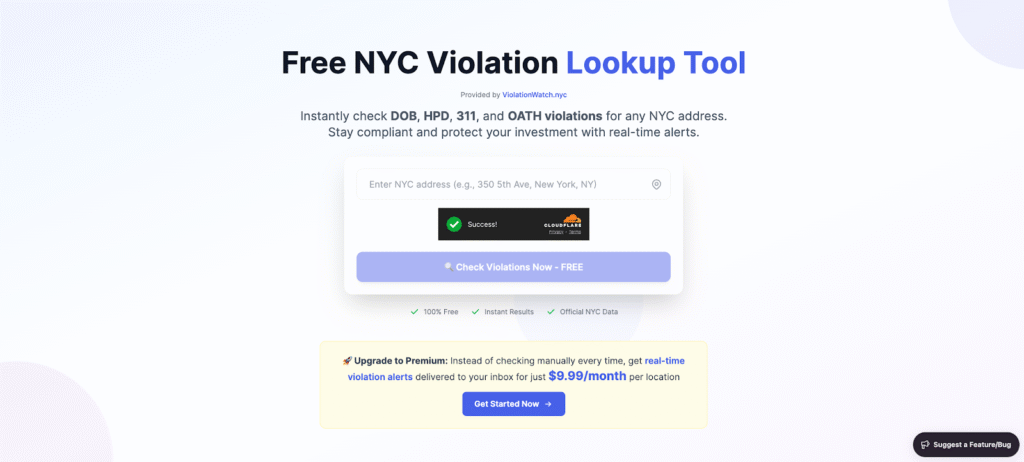
Before committing to a monitoring platform, you can test the waters with ViolationWatch’s Free NYC Building Violations Lookup tool. Enter any NYC address and pull up its complete violation history instantly. The tool shows:
- All active HPD violations are tied to the property
- Violation descriptions and severity levels
- Issue dates and current status
- Related complaints and inspection records
This free lookup gives you a snapshot of what automated monitoring can do. Instead of opening HPD’s portal and clicking through multiple pages, you get comprehensive violation data in seconds. It’s a useful tool for spot checks, due diligence on new acquisitions, or verifying whether specific addresses have compliance issues.
The difference between the free lookup and full monitoring is simple: the lookup shows you what’s there right now, while the monitoring platform watches for changes and alerts you automatically over time.
Multi-Location Tracking in a Single Dashboard
Managing violations across multiple properties turns chaotic fast when you’re checking each building separately. Automated platforms consolidate everything into one interface.
ViolationWatch’s dashboard displays your entire portfolio at a glance. You see which buildings have open violations, how many are pending resolution, and which properties are clean. Color-coded indicators and filtering options help you sort through the data quickly.
Key dashboard features:
- View all properties and their violation counts side by side
- Filter by agency (HPD, DOB, FDNY, ECB, etc.) to focus on specific compliance areas
- Sort by violation severity to prioritize urgent issues
- Track resolution progress across your portfolio without switching between tools
This centralized approach saves hours. You’re not juggling multiple browser tabs or spreadsheets. Everything lives in one place, updated automatically as violations appear or get resolved.
Stop Checking Portals, Start Getting Notified
HPD won’t send you alerts when violations hit your buildings. That’s not changing anytime soon. The portal exists to display data, not to help you manage it proactively.
Here’s what happens when you stop relying on manual checks and switch to automated monitoring:
- You catch violations within minutes instead of days or weeks, giving you maximum time to respond before deadlines tighten and fines start accumulating
- Your entire team stays informed automatically through WhatsApp and email alerts, eliminating the need for manual updates or internal communication gaps
- You manage your entire portfolio from one dashboard instead of logging into government portals repeatedly and searching properties one by one
- You access all violation documents in a single location, cutting down on the time spent hunting through city databases for inspection reports and compliance records
ViolationWatch handles the monitoring work you’ve been doing manually. Add your properties once, and the platform watches them around the clock. New HPD violations trigger instant alerts. Status changes get tracked automatically. Your dashboard updates in the background while you focus on fixing problems instead of finding them.You can try the free lookup tool to see how fast automated tracking works, or sign up at ViolationWatch to start monitoring your portfolio with full alerts and multi-property coverage.